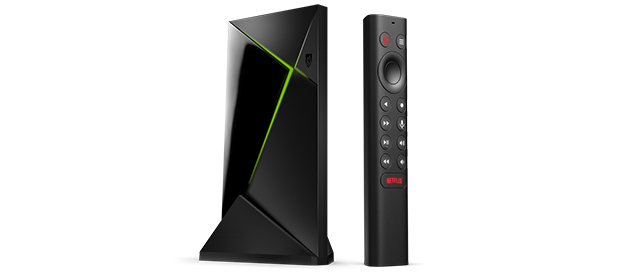
Acerca De SHIELD TV Pro
Gracias por elegir NVIDIA SHIELD TV Pro.Esta guía del usuario te ayudará a empezar y te ofrece consejos para sacar el máximo partido de tu dispositivo SHIELD.
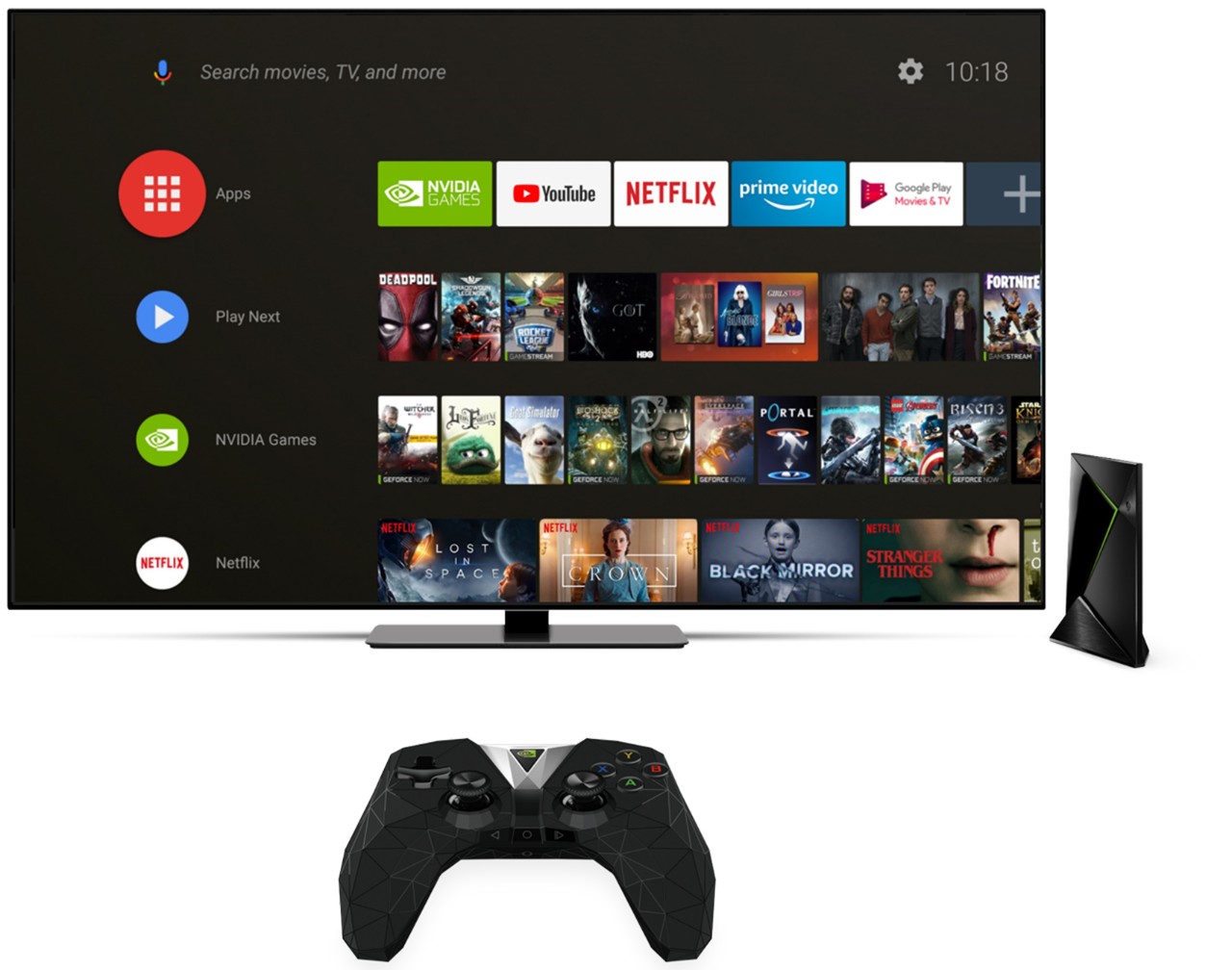
1. Contenido De La Caja
SHIELD TV Pro comes with the following:

SHIELD TV Pro

Mando a distancia SHIELD

Adaptador de corriente externo
A Quick Start guide and Support booklet are also included.
2. Empezar
2.1 Todo Lo Necesario
He aquí lo que necesitarás para empezar a utilizar tu dispositivo SHIELD TV:
- Televisor o monitor con puerto HDMI (compatible con HDCP)
- Cable HDMI 2.0 de alta velocidad
- Conexión a Internet por Wi-Fi o Ethernet
- Una cuenta de Google
2.2 Configuración
Aquí te indicamos cómo conectar tu SHIELD TV Pro y el mando a distancia:
- Conecta el dispositivo SHIELD TV al televisor con un cable HDMI 2.0 de alta velocidad.
- Asegúrate de que el televisor o monitor esté apagado y conecta un extremo del cable HDMI al puerto HDMI de la parte trasera del dispositivo SHIELD TV.Conecta el otro extremo del cable a un puerto HDMI del televisor o receptor.
- Conecta el dispositivo SHIELD TV a la corriente con el cable de alimentación.
- Conecta un extremo del cable de alimentación a la parte trasera del dispositivo SHIELD TV y el otro extremo a una toma de corriente.El dispositivo SHIELD TV se encenderá automáticamente cuando lo enchufes a la corriente y veas que se enciende la luz verde.Cuando no lo utilices, se pondrá automáticamente en modo de suspensión.
- OPCIONAL: Conecta el dispositivo SHIELD TV a Ethernet. Si no utilizas una conexión Ethernet, puedes conectarte a tu red Wi-Fi más adelante.
- Enciende el televisor y cambia al HDMI en el que está conectado el dispositivo SHIELD TV.
- Comprueba la etiqueta del puerto HDMI del televisor o monitor.
- Sigue las instrucciones que aparecen en pantalla para iniciar sesión en tu cuenta de Google y conectarte a Wi-Fi (si es necesario)
2.3 Conexión Del Mando a Distancia SHIELD
El mando a distancia SHIELD se incluye automáticamente con el dispositivo SHIELD TV. Tan solo has de presionar el botón Seleccionar para comenzar.
2.4 Ayuda Para La Conexión a Wi-Fi
Si tu red requiere autenticación en la web (portal cautivo), SHIELD TV presentará la página de autenticación en la web y te permite iniciar sesión.
Prueba estos pasos si tu dispositivo no se conecta al wifi; haz clic aquí.
2.5 Configuración Del Mando a Distancia SHIELD Para El Control De Volumen
El mando a distancia SHIELD puede controlar tu televisor o receptor de AV mediante IR. Para configurar el control de volumen IR o CEC, vete a Configuración > Preferencias del dispositivo > Pantalla y sonido > Control de volumen
Las opciones para el control de volumen son:
- HDMI-CEC (recomendado si el televisor o el receptor lo admite)
- IR (requiere que apuntes el mando a distancia a tu televisor o receptor)
3. Conoce Tu SHIELD TV
3.1 SHIELD TV Pro

Luz de SHIELD TV Pro
| Nota: | Para ajustar el brillo de la luz de SHIELD, vete a Configuración > Preferencias del dispositivo > Sistema > Brillo LED |

USB 3.0 / USB PC Connection port
USB 3.0
HDMI 2.0
Ethernet
Power in
| NOTA: | Para conectar SHIELD al PC a través de un cable USB, vete a Configuración > Preferencias del dispositivo > Almacenamiento > Transferir archivos a un ordenador utilizando USB. |
| NOTA: | Si la opción "Usar USB" está habilitada, ya no se puede utilizar la ranura USB para almacenamiento externo ni para conectarse a otros dispositivos periféricos. |
3.2 SHIELD Remote
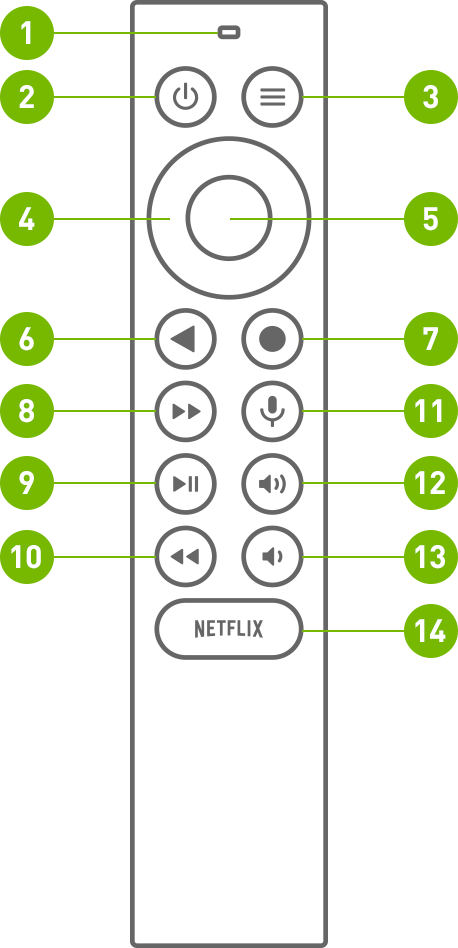
Hay 1 micrófono integrado y 13 botones en SHIELD REMOTE.
MICRÓFONO INTEGRADO; en la parte superior del SHIELD REMOTE
Botón de ENCENDIDO; el botón izquierdo de la primera fila
Botón CONFIGURACIÓN; el botón derecho en la primera fila. También puedes personalizar el botón de configuración introduciendo la ruta siguiente
(personalizable en Configuración > Dispositivos y accesorios > botón Configuración personalizable)
Botón NAVIGATION RING; el botón del anillo exterior en la segunda fila
Botón SELECCIONAR; el botón circular interior
Botón ATRÁS; el botón izquierdo de la tercera fila
Botón INICIO; el botón derecho en la tercera fila
Botón AVANCE RÁPIDO; el botón izquierdo de la cuarta fila
Botón REPRODUCIR/PAUSAR; el botón izquierdo en la quinta fila
Botón de RETROCEDER; el botón izquierdo en la sexta fila
Botón BÚSQUEDA POR VOZ; el botón derecho en la cuarta fila
Botón AUMENTAR EL VOLUMEN; el botón derecho en la quinta fila
Botón DISMINUIR EL VOLUMEN; el botón derecho en la sexta fila
Botón ABRIR NETFLIX, botón ovalado en la última fila, oval button on the last row
3.3 Cómo Utilizar El Mando a Distancia SHIELD
3.3.1 Navegar
Utiliza el anillo de navegación (Arriba, Abajo, Izquierda o Derecha)
3.3.2 Seleccionar un elemento
Pulsa el botón Seleccionar
3.3.3 Ir a la pantalla anterior
Pulsa el botón Volver.
3.3.4 Ir al escritorio
Pulsa el botón Escritorio.
3.3.5 Acceder a las aplicaciones recientes
Pulsa dos veces el botón Escritorio.
3.3.6 Acceder a todas las aplicaciones
Mantén pulsado el botón Escritorio
3.3.7 Transmitir y grabar juegos
Mantén pulsado el botón Escritorio (NVIDIA Share debe estar habilitado)
3.3.8 Abrir el menú de ajustes
Pulsa el botón Configuración o mantén pulsado el botón VOLVER (desde el escritorio)
3.3.9 Suspensión de SHIELD
Pulsa el botón de encendido (el televisor se apagará si el control de alimentación HDMI-CEC o IR están habilitados)
3.3.10 Búsqueda por voz con Google Assistant
Pulsa y suelta el botón de búsqueda por voz y da la orden.Prueba con "Jugar a Stranger Things" o "¿Qué tiempo hace?"
3.3.11 Ajustar el volumen
Pulsa los botones de subir o bajar volumen.
3.3.12 Mute
Press +Vol and -Vol together
3.3.13 Avance rápido
Pulsa el botón de avance rápido.
3.3.14 Rebobinado
Pulsa el botón de rebobinado.
3.3.15 Reproducir o pausar
Pulsa el botón de reproducción/pausa.
3.3.16 Poner el mando a distancia en modo de emparejamiento
Mantén pulsados los botones Escritorio y Volver hasta que se enciendan.
3.4. Cómo conectar el mando a distancia
El mando a distancia SHIELD se conecta automáticamente al dispositivo SHIELD TV para su uso inmediato. Basta con pulsar el botón Seleccionar para activarlo.
Asegúrate de que la pantalla de inicio de SHIELD se ve en el televisor.
Mantén el mando a distancia SHIELD a 30 cm del SHIELD TV.
Si estás emparejando un nuevo mando a distancia, mantén pulsado el botón Seleccionar del mando hasta que la luz parpadee y se reproduzca un aviso de voz. Si el mando a distancia se ha emparejado con un SHIELD diferente, mantén pulsados los botones Inicio y Atrás hasta que la luz del mando parpadee y se reproduzca un aviso de voz.
El mando debería conectarse tras unos instantes. Cuando el emparejamiento se realice correctamente, oirás una solicitud de voz.
Para conectar un nuevo mando a distancia a SHIELD, sigue las instrucciones aquí.
| NOTA : | El mando a distancia SHIELD se activa y desactiva automáticamente.Si el mando a distancia no responde, es posible que tengas que reemplazar las baterías del mando a distancia.El nivel de carga de la batería se puede comprobar en la aplicación Accesorios SHIELD. |
3.5 Botón Configuración Personalizable
El botón Configuración abre Configuración de forma predeterminada, pero puedes personalizarlo para realizar tus actividades favoritas. Para cambiar el comportamiento del botón Configuración, vete a Configuración > Mandos a distancia y accesorios > botón Personalizar configuración.
3.6 Localización Del Mando a Distancia SHIELD Perdido
El mando a distancia SHIELD tiene una función de localizador. Cuando se activa, el mando a distancia SHIELD reproducirá una melodía audible. Este buscador de audio dejará de reproducirse después de 10 segundos. Hay varias maneras de activar esta función:
Botón de localizador remoto en SHIELD
- Locate the remote locator button on one end of your SHIELD (above the HDMI port) and press to start locating your SHIELD.
Aplicación móvil SHIELD TV (iOS/Android)
- Descarga la aplicación SHIELD TV para tu dispositivo si no lo has hecho ya.
- Toca "más opciones" en la aplicación (tres puntos en la esquina superior derecha).
- Toca "buscar mi mando a distancia"
Google Home
- Nota importante: Tu dispositivo Google Home debe estar en la misma red que tu dispositivo SHIELD y usar la misma cuenta de Google con la que has iniciado sesión en SHIELD.
- En un dispositivo Google Home, di "OK Google, inicia el localizador remoto de SHIELD".
Dispositivos Amazon Echo
- Nota importante: Debes haber emparejado el dispositivo Echo a SHIELD con la capacidad Amazon Alexa.
- En tu dispositivo Echo, di "Alexa, pide a SHIELD que busque mi mando a distancia"
Nota: El localizador remoto solo funcionará si el mando a distancia SHIELD está conectado a tu dispositivo SHIELD. Entre las razones comunes por las que es posible que la función de localizador no funcione se incluyen:
- Pérdida de alimentación en tu SHIELD (comprueba la conexión del cable de alimentación).
- Niveles de batería críticamente bajos/vacíos en el mando a distancia.
- Pérdida de emparejamiento entre el mando a distancia y SHIELD.
Customize Remote Name
- Se puede asignar un nombre personalizado al mando a distancia SHIELD.Para cambiar el nombre del mando a distancia SHIELD, ve a Mandos a distancia y accesorios > Accesorios SHIELD > Controlador activo > Nombre del accesorio.
Battery Replacement
El mando a distancia SHIELD utiliza dos (2) pilas AAA para su alimentación.Para reemplazar las pilas, sigue estas instrucciones.
- Desliza la cubierta de la parte posterior del mando a distancia SHIELD hacia fuera.
- Localiza la flecha hacia abajo en la parte posterior del mando a distancia SHIELD.
- Con el pulgar, presiona hacia adentro y hacia abajo para deslizar la cubierta posterior hacia fuera.
- Sustituye las pilas colocando el terminal "+" hacia abajo.
- Desliza de nuevo la bandeja de la batería hacia dentro en el mando a distancia SHIELD hasta que se escuche un clic suave.
3.7 Habilitación De Actualizaciones Automáticas Del Sistema
El dispositivo SHIELD puede descargar e instalar automáticamente las actualizaciones del sistema. Para habilitar esta función, vete a Configuración > Preferencias del dispositivo > acerca de > Actualización del sistema y activa "Actualización automática". También puedes especificar una hora para que SHIELD aplique la actualización.
3.8 Búsqueda De Actualizaciones Del Sistema
Las actualizaciones del sistema se envían a tu dispositivo SHIELD TV directamente desde NVIDIA.Aparecerá un banner de notificación en la parte superior del escritorio de SHIELD TV cuando haya una actualización disponible.Selecciona "Detalles" en la notificación para descargar y aplicar automáticamente la actualización en el dispositivo SHIELD TV.También puedes buscar actualizaciones de forma manual yendo a Configuración > Preferencias del dispositivo > Acerca de > Actualización del sistema.
3.9 Accesibilidad: función Talkback
Para activar la función Talkback:
- Pulsa ATRÁS+ABAJO durante 3 segundos hasta que escuches la voz.
- Mantén pulsadas las teclas BACK+ABAJO durante 3 segundos de nuevo para activar Talkback.
Para desactivar la función Talkback:
- Pulsa y mantén pulsadas las teclas BACK+ABAJO durante 3 segundos de nuevo para desactivar Talkback.
4. Introducción a Android TV
4.1 Diseño Básico Y Navegación
Desde el escritorio de Android TV, puedes acceder fácilmente a películas, programas de televisión, música, aplicaciones, juegos y ajustes.Para llegar al escritorio en cualquier momento, pulsa el botón Escritorio del mando a distancia SHIELDo de SHIELD Controller.

1. Aplicaciones favoritas
Elige las aplicaciones que quieras y en el orden que quieras. Mantén pulsado el botón Seleccionar de una aplicación para moverla. Para acceder a todas las aplicaciones, mantén pulsado el botón Escritorio o selecciona el icono rojo Aplicaciones.
2. Reproducir siguiente
Retoma cualquier programa de televisión, película o juego donde lo dejaste. Para añadir contenido a Reproducir siguiente, ve al contenido y mantén pulsado el botón Seleccionar.
| NOTA: | La función Reproducir siguiente no está disponible en todas las aplicaciones. |
3. Canales
Descubre nuevas formas de entretenimiento desde tus aplicaciones favoritas. Elige los canales que quieras y en el orden que quieras. Desplázate a la izquierda de un canal para moverlo o eliminarlo.
| NOTA: | La función Canales no está disponible en todas las aplicaciones. |
Buscar
También puedes buscar en Android TV navegando a la parte superior del escritorio y seleccionando el icono de búsqueda.También puedes iniciar la búsqueda por voz al instante en cualquier momento pulsando el botón NVIDIA de SHIELD Controller o pulsando el botón de búsqueda por voz del mando a distancia SHIELD.Obtén más información sobre lo que puedes buscar en Android TV.
5. Juegos Y Aplicaciones
Se puede acceder a todos los juegos y las aplicaciones instalados seleccionando el icono "Aplicaciones" del escritorio o pulsando prolongadamente "Escritorio" en el mando a distancia SHIELD

5.1 Obtener más aplicaciones (Google Play Store)
Utiliza este acceso directo para acceder a Google Play Store y buscar las últimas aplicaciones disponibles para SHIELD TV.
5.2 Iniciar aplicación o juego
Pulsa Seleccionar para iniciar inmediatamente la aplicación.
5.3 Mover, desinstalar o añadir a la línea "Aplicaciones favoritas"
Mantén pulsado "seleccionar" prolongadamente para acceder al menú de la aplicación.
6. Configuración Rápida
La función Configuración rápida, a la que se puede acceder pulsando el botón "Configuración" del mando a distancia SHIELD, proporciona fácil acceso a ajustes de uso común. Las entradas de configuración rápida son personalizables. Para añadir, eliminar o reordenar entradas, ve a Configuración > Preferencias del dispositivo > Sistema > Personalizar la configuración rápida .

7. Escalado Mediante Ia
SHIELD ofrece escalado con tecnología IA, capaz de escalar de forma inteligente vídeo de menor resolución a la resolución nativa de tu televisor. Con esta nueva función, las películas en HD en Netflix o Prime Video se verán más nítidas en tu pantalla 4K.
De forma predeterminada, el escalado "Mejorado" está habilitado en tu SHIELD. Para habilitar el escalado "Mejorado con IA", ve a Configuración > Escalado mediante IA y selecciona "Mejorado con IA".
La mejora de detalles es una opción exclusiva de "Mejorado con IA" que puedes personalizar en función de tus propias preferencias. Hay un modo de demostración en paralelo disponible para comparar "Básico" con el escalado mediante IA.
Demo mode will let the user see the difference SHIELD's new scaling technology makes in real time.
- Press the Settings button on the SHIELD remote to quickly switch between AI upscaling and Basic upscaling
- Hold the Settings button to toggle the slider viewer

| Nota: | La función Escalado mediante IA no está disponible con los siguientes tipos de contenido:
|
8. Google Assistant en SHIELD TV
8.1 Uso De Google Assistant
Con Google Assistant en SHIELD puedes encontrar películas y programas de televisión, iniciar aplicaciones y juegos, y controlar tu hogar inteligente.Es todo cuanto te gusta de Google Home, pero mejorado para tu sala de estar.
8.2 Disponibilidad
Google Assistant para SHIELD está actualmente disponible en los siguientes idiomas
- Inglés de EE. UU.
- Inglés británico
- Inglés canadiense
- Inglés australiano
- Francés
- Alemán
- Español
- Italiano
Se prevé ampliar la compatibilidad con otros países, pero aún no está disponible.
8.3 Uso De Google Assistant
En el mando a distancia SHIELD:
- Desde cualquier aplicación o el escritorio, pulsa y suelta el botón de búsqueda por voz.

- Sostén el mando a distancia SHIELD frente a ti y plantea tu pregunta. Los resultados de tu asistente aparecerán tan pronto como termines de hablar.
| Nota: | Si estás en una habitación con mucho ruido de fondo u otras personas hablando, pulsa inmediatamente Seleccionar en el mando a distancia SHIELD cuando hayas terminado de hablar para enviar la búsqueda por voz.Esto evitará que la detección de voz continúe escuchando. |
8.4 Visualización De Más Resultados
En la mayoría de los casos, puedes obtener más resultados si pulsas ARRIBA en el mando a distancia SHIELD.Los resultados de búsqueda de otras aplicaciones se muestran en este menú.
8.5 Manos Libres "Ok Google"
Si tienes un SHIELD Controller 2017, puedes decir "OK Google" u "Hola, Google" para comenzar tu solicitud.
Para habilitar esta función, ve a Configuración > Preferencias del dispositivo > Google Assistant > Activar la detección "OK Google" .
8.6 Qué Haces Con Google Assistant en Shield
Echa un vistazo a los siguientes ejemplos para obtener información sobre algunas de las cosas que puedes hacer con Google Assistant en SHIELD TV.
8.7 Apagar el televisor y SHIELD (requiere el control HDMI CEC activado)
- "Apaga el televisor"
8.8 Buscar películas o programas de televisión
- Buscar por título
- "Muéstrame películas de Batman"
- "Quiero ver Arrested Development"
- Buscar por director o actor
- "Muéstrame películas dirigidas por Steven Spielberg"
- "Muéstrame programas de televisión con Chris Pratt"
- Usar cualquier combinación de términos de búsqueda
- "Muéstrame películas de acción con Tom Cruise"
- "Muéstrame comedias con The Rock"
8.9 Reproducir al instante tus programas favoritos
Algunas aplicaciones como Netflix, Hulu, YouTube y HBO Now pueden empezar a reproducir programas automáticamente.
- "Ver Stranger Things en Netflix"
- "Reproduce vídeos de gatos en YouTube"
8.10 Iniciar tu aplicación favorita
- "Abre juegos NVIDIA"
- "Inicia Netflix"
8.11 Controlar tu hogar inteligente
Al vincular tus dispositivos domésticos inteligentes a Google Assistant, puedes controlar las luces y los interruptores con tu voz.
- "Enciende las luces de la sala de estar"
- "Atenúa las luces al 50%"
8.12 Planificar tu día
- "¿Cuál es mi primera reunión de hoy?"
- "Cuánto tiempo dura mi viaje esta mañana"
8.13 Mostrar fotos de tu cuenta de Google Photos
- "Muéstrame mis fotos de 2010"
- "Muéstrame mis fotos de coches"
8.14 Y mucho más
8.15 Qué Aplicaciones Aparecen en Los Resultados De Búsqueda
También puedes ver los resultados de búsqueda de las aplicaciones que has instalado en tu Android TV.Estos resultados se mostrarán en una línea independiente.Algunos resultados de búsqueda estarán disponibles en algunas otras aplicaciones.Cuando selecciones el contenido, podrás elegir la aplicación que quieras usar.Puedes personalizar los resultados yendo a Configuración > Preferencias del dispositivo > Google Assistant > Aplicaciones que se pueden buscar y habilitar las aplicaciones cuyos resultados quieres ver.
8.16 Realización De Una Búsqueda De Voz Dentro De La App
También puedes utilizar la búsqueda por voz dentro de muchas aplicaciones.Si inicias una búsqueda por voz dentro de una aplicación, solo obtendrás los resultados de búsqueda de esa aplicación.
8.17 Ayuda E Información Adicionales
9. Suspensión O Reinicio
9.1 Suspensión
SHIELD TV quedará automáticamente en suspensión después del período de tiempo:
- En el escritorio de SHIELD TV, selecciona Configuración > Preferencias del dispositivo > Protector de pantalla .
- Selecciona Cuándo empezar.
- Selecciona una de las opciones.
9.2 Reinicio
Para reiniciar:
- En la configuración de SHIELD TV, selecciona "Reiniciar"
- Si esto no funciona, también puedes desconectar el cable de alimentación, esperar 10 segundos y luego volver a conectarlo.
10. Tiempo en Suspensión Y Protector De Pantalla
Puedes configurar un salvapantallas para SHIELD TV que muestre fotos y diseños coloridos.El salvapantallas utiliza una colección de fotos de paisajes.
10.1 Eleccion Del Salvapantallas
- En el escritorio de SHIELD TV, selecciona Configuración > Preferencias del dispositivo > Protector de pantalla .
- Selecciona Protector de pantalla de nuevo.
- Elige entre las opciones disponibles.
10.2 Establecimiento Del Tiempo De Espera Del Protector De Pantalla
Puedes elegir cuánto tiempo tarda tu salvapantallas en comenzar cuando no usas tu SHIELD TV:
- En el escritorio de SHIELD TV, selecciona Configuración > Preferencias del dispositivo > Protector de pantalla .
- Selecciona Poner el dispositivo en suspensión.
- Selecciona una de las opciones.
11. Incorporación De Accesorios Bluetooth
Puedes usar accesorios Bluetooth, como un teclado, un ratón o un mando de juego inalámbricos con tu SHIELD TV.
Para agregar un accesorio Bluetooth:
- En el escritorio de SHIELD TV, selecciona Configuración .
- En Mando a distancia y accesorios, selecciona Añadir accesorio .El dispositivo SHIELD TV buscará accesorios Bluetooth dentro del alcance.
- Pon el accesorio en modo de conexión.
- Verás tu accesorio en la pantalla del televisor.Selecciona el accesorio.
- SHIELD TV se conectará con el accesorio.
Problemas Para añadir Un Accesorio Bluetooth
12. Configuración De Pantalla 4K HDR/dolby Vision
SHIELD TV admite contenido de resolución 4K Ultra HD (3840 x 2160p) con HDR10 o Dolby Vision, desde muchas aplicaciones.
Para asegurarte de que tu dispositivo SHIELD TV está optimizado para la salida de vídeo 4K, manténlo actualizado con el software del sistema más reciente.
Para ver contenido 4K en SHIELD TV se requiere una pantalla 4K compatible con HDMI 2.0 y HDCP 2.2.Asegúrate de que SHIELD TV esté conectado a una entrada HDMI compatible con HDCP 2.2.Consulta la guía del usuario de la pantalla 4K para encontrar el puerto HDMI correcto al que hay que conectar SHIELD TV para ver contenido 4K.
Considera la posibilidad de utilizar el puerto HDMI-UHD para la compatibilidad con 4K.De forma predeterminada, algunos televisores tienen la entrada UHD desactivada en la configuración del televisor, así que asegúrate de que la opción UHD esté habilitada para esta entrada en la configuración de tu televisor.
13. Habilitación De Dolby Vision/HDR10 en SHIELD
Tu dispositivo SHIELD se establecerá automáticamente en un modo de visualización compatible con HDR10 cuando se detecte.
Si tienes una pantalla compatible con Dolby Vision a resoluciones 4K con frecuencia de actualización de 60 Hz, habilita Dolby Vision seleccionando Configuración> Preferencias del dispositivo > Pantalla y sonido > Dolby Vision
Si no puede activar "Dolby Vision", los cables HDMI pueden ser el problema. Prueba a reemplazarlos por cables de mayor calidad e inténtalo de nuevo.
Si el televisor admite 4K Dolby Vision a frecuencias de actualización más bajas, puedes cambiar el modo de visualización en Configuración> Preferencias del dispositivo > Pantalla y sonido > Configuración avanzada de visualización > Modo de visualización personalizado y seleccionar cualquier modo etiquetado como "Dolby Vision Ready".
| Advertencia: | La elección de modos de visualización de menor frecuencia de actualización hará que el escritorio y la navegación de la aplicación parezcan lentos. |
14. Habilitación De Dolby Vision/HDR10 en El Televisor
Algunos televisores HDR no tienen la salida HDR habilitada de forma predeterminada para HDMI.Para habilitar la salida HDR de SHIELD, consulta el manual de uso del televisor.He aquí los ajustes para algunos de los televisores más comunes:
- Televisores HDR de Samsung: Menu > Picture >Picture Options > HDMI UHD Color > On > Restart (Menú > Imagen > Opciones de imagen > HDMI UHD Color > Activar > Restablecer)
- Televisores HDR de LG: Home > HDMI > Settings > Advanced > Picture > HDMI ULTRA DEEP COLOR > On > Restart (Inicio > HDMI > Ajustes > Avanzados > Imagen > HDMI ULTRA DEEP COLOR > Activar > Reiniciar)
- Televisores HDR de Sony: Home > Settings > External inputs > HDMI signal format > HDMI [seleccionar la entrada de SHIELD] > Enhanced mode (el televisor se reiniciará) (Inicio > Ajustes > Entradas externas > Formato de la señal HDMI > HDMI > Modo mejorado)
15. Ver Netflix en 4K O HDR
Para ver programas de Netflix en 4K o HDR, es posible que tengas que actualizar tu cuenta de servicio de Netflix al "plan 4 pantallas".Consulta el artículo de Netflix sobre sus últimos requisitos para transmitir contenido 4K o HDR.http://help.netflix.com/en/node/42384
16. Configuración De Audio Envolvente/receptor A/V
SHIELD TV admite Dolby Digital (AC3), Dolby Digital Plus (E-AC3), Dolby ATMOS, Dolby TrueHD, DTS:X y DTS Core Audio Streams.El audio Dolby se puede descodificar o convertir al mejor formato disponible para tu cine en casa. El audio DTS no se convertirá y se pasará directamente a la salida HDMI.
Para utilizar sonido envolvente, necesitarás un receptor A/V o televisor capaz de descodificar este tipo de cadenas de audio.
| NOTA | Si el receptor o televisor HDMI no puede descodificar las cadenas, no dispondrás de sonido alguno. |
| NOTA | Asegúrate de que el receptor esté actualizado con la última versión de firmware.En algunos casos, la actualización corregirá problemas de compatibilidad y de audio/vídeo. |
(I) Configuración recomendada: SHIELD > AVR > TV
- Conecta el dispositivo SHIELD TV a un receptor con un cable HDMI.
- Conecta otro cable HDMI entre el puerto HDMI OUT del receptor y el televisor.

| NOTA | Si tienes un televisor 4K o HDR, deberás utilizar cables compatibles con HDMI 2.0 para conectar el dispositivo SHIELD al receptor A/V y el receptor A/V a la pantalla.El receptor A/V también deberá ser compatible con la señal HDMI 2.0 (HDCP 2.2). |
(II) Barra de sonido o receptor A/V heredado: SHIELD TV o receptor A/V
| ADVERTENCIA:: | Esta configuración solo debe utilizarse si la barra de sonido o el receptor A/V no son compatibles con 4K, HDR o Dolby Vision. La barra de sonido debe ser compatible con Dolby Digital |
- Conecta el dispositivo SHIELD TV a un televisor con un cable HDMI.
- Conecta el televisor al receptor mediante SPDIF óptico o canal de retorno de audio HDMI (HDMI-ARC)
- En Configuración > Preferencias del dispositivo > Pantalla y sonido > Configuración avanzada de sonido > Formatos disponibles, selecciona Manual y desactiva todos los formatos Dolby excepto AC3.

Habilitación De SHIELD Para Encender Y Apagar El Televisor O Receptor A/V
SHIELD puede controlar la alimentación de tu televisor o receptor A/V mediante HDMI-CEC. Ve a Pantalla y sonido > Control de alimentación para personalizar la forma en que SHIELD controla el televisor/receptor A/V.
Si el televisor o receptor A/V no es compatible con HDMI-CEC, puedes configurar el mando a distancia SHIELD para enviar comandos por infrarrojos a los dispositivos desde este menú.
| NOTA | La mayoría de los televisores tienen la función "apagar TV" de HDMI-CEC desactivada en el menú de configuración del televisor.HDMI-CEC (One Touch Play y TV desactivados) debe estar habilitado en la configuración del televisor.Busca el nombre del fabricante del televisor y HDMI-CEC para averiguar cómo lo llaman y cómo habilitarlo. |
17. Sincronización A/V
El uso de un receptor A/V con HDMI para vídeo puede provocar retardos de audio en el vídeo.En primer lugar, intenta utilizar los ajustes de sincronización A/V del receptor que quieres calibrar.Si esto no funciona, usa la utilidad de control deslizante de sincronización A/V en Configuración > Preferencias del dispositivo > Pantalla y sonido > Configuración avanzada > Sincronización de audio y vídeo para calibrar el retardo de audio.El control deslizante de sincronización A/V te permite avanzar el audio en 1 segundo (en pequeños incrementos de 10 ms) para sincronizar el audio y el vídeo.
Ten en cuenta que esta herramienta solo es eficaz cuando SHIELD está conectado al receptor A/V a través de HDMI (es decir, audio/vídeo a través de HDMI); no está destinada a ser utilizada cuando haya un auricular conectado al mando SHIELD /Mando a distancia SHIELD o dispositivo de audio Bluetooth.
Si el vídeo se queda rezagado con respecto al audio (es decir, el audio está por delante del vídeo), utiliza la configuración del receptor A/V para retrasar el audio.
17.1 Ajuste De La Sobreexploración
Para los televisores que no proporcionan sus propios ajustes de sobreexploración, utiliza esta configuración para ajustar el tamaño de la imagen a la pantalla.
Vete a Configuración > Preferencias del dispositivo > Pantalla y sonido > Configuración avanzada > Ajustar sobreexploración para cambiar el tamaño de la imagen en tu televisor o pantalla.Utiliza los botones ARRIBA y ABAJO del mando a distancia para maximizar la imagen del televisor.Asegúrate de que los triángulos verdes son completamente visibles para evitar la sobreexploración.
18. NVIDIA Share
Puedes compartir fácilmente tus momentos de juego con NVIDIA Share y la transmisión a Twitch. NVIDIA Share te permite guardar y grabar vídeos y pantallas para compartirlos con tus amigos. Share puede grabar varios minutos de juego en segundo plano, de forma que no te pierdas ni un solo momento emocionante. NVIDIA Share te permite también transmitir el juego en directo a Twitch.
| NOTA: | Preferencias del dispositivo > Sistema para activar "NVIDIA Share" El streaming de Twitch requiere que la autenticación de dos factores esté habilitada en tu cuenta de Twtich. |
18.1 Menú NVIDIA SHARE
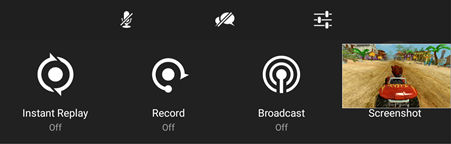
- Inicia el juego que quieres compartir.
- En SHIELD Controller, mantén pulsado el botón Escritorio . El juego se detendrá y aparecerá el menú Compartir:
- Selecciona la opción Repetición instantánea para grabar los últimos cinco minutos de juego.
- Pulsa de nuevo el botón Volver para volver a la reproducción del juego. El juego se está grabando.
- Cuando estés listo para compartirlo, mantén pulsado el botón Escritorio para volver a acceder al menú Compartir. Si seleccionas la opción Grabación automática, podrás indicar qué hacer con la grabación mediante las opciones Guardar, Guardar y compartir y Detener.
- También puedes utilizar la opción Grabar si quieres que la grabación no se limite a los últimos cinco minutos del juego.
- Para capturar una pantalla de la acción en cualquier momento, selecciona la opción Captura de pantalla para guardarla en el dispositivo.
Los vídeos y las capturas de pantalla se guardan de forma predeterminada en la aplicación "Fotos y vídeos".
18.2 Transmisión a Twitch
- Inicia el juego que quieres transmitir.
- Mantén pulsado el
 botón . Escritorio del mando. El juego se detendrá y aparecerá el menú Compartir:
 - Selecciona la opción Transmitir en el menú para iniciar el streaming a Twitch. Si todavía no hecho, el sistema te pedirá que inicies sesión con tu cuenta de Twitch.
18.3 Ajustes Del Menú Compartir
- En la línea superior del menú Compartir, el botón Ajustes te permite cambiar una serie de parámetros para optimizar la forma de compartir tu experiencia.
- Ajustes de Twitch: modifica los ajustes específicos de la transmisión a Twitch.
- Cambiar calidad: ajusta la calidad de vídeo del contenido grabado.
- Repetición instantánea de últimos: determina la duración de la repetición, que puede llegar hasta 20 minutos de juego.
- Estado: muestra u oculta la información que aparece en el HUD durante la grabación, que incluye el estado del micrófono (activado/desactivado), el icono de grabación, la resolución de vídeo, la frecuencia de fotogramas y la velocidad de bits.
- Grabar automáticamente últimos: duración máxima del juego grabado con la opción automática
- Volumen del micrófono: mueve el control deslizante para ajustar el volumen del micrófono.
- Ajustar diseño: personaliza la interfaz de usuario que se muestra en pantalla durante la transmisión.
19. Acerca De La Pantalla SHIELD
Los detalles sobre tu SHIELD TV se pueden encontrar en Configuración > Preferencias del dispositivo > Acerca de.
Desde este menú, puedes
- Buscar actualizaciones del sistema manualmente
- Cambiar el nombre del dispositivo SHIELD
- Información legal
- Encuentra información adicional del sistema, como, por ejemplo,
- N.º de serie
- Dirección IP
- Dirección MAC de red
20. Restablecimiento De SHIELD
20.1 Restablecimiento De Los Ajustes De Fábrica
| NOTA | Al restablecer los datos de fábrica, se eliminarán todos los datos del dispositivo SHIELD.La información asociada a tu cuenta de Google se puede recuperar.También se eliminarán los ajustes del dispositivo. |
20.2 Restablecimiento Mediante Ajustes
Para restablecer los ajustes de fábrica del dispositivo SHIELD TV, sigue estos pasos:
- En el escritorio, selecciona Configuración > Preferencias del dispositivo > Restablecer.
- Selecciona Restablecer.
- Selecciona Borrar todo para confirmar y restablecer el dispositivo.
21. Conexión Del Almacenamiento a SHIELD
Se puede conectar almacenamiento USB adicional al dispositivo SHIELD. El almacenamiento conectado se establece automáticamente como "almacenamiento extraíble" y SHIELD puede leer y escribir directamente en el dispositivo de almacenamiento. No se pueden instalar aplicaciones ni datos de aplicaciones en el "almacenamiento extraíble". Para aumentar el almacenamiento para instalar aplicaciones, el almacenamiento conectado se debe formatear como "almacenamiento del dispositivo".
Para formatear el dispositivo de almacenamiento como "almacenamiento del dispositivo", selecciona Configuración
> Preferencias del dispositivo > Almacenamiento > [Dispositivo de almacenamiento] > Configurar como almacenamiento del dispositivo. Esto formateará y cifrará el dispositivo de almacenamiento.
SHIELD TV es compatible con los sistemas de archivos FAT32, exFAT, NTFS y HFS+.
21.1 Cómo Agregar Almacenamiento De Red
SHIELD TV puede agregar dispositivos de almacenamiento conectado en red (NAS). Esto puede resultar útil si tienes gran cantidad de elementos multimedia personales compartidos en una red a los que quieres acceder en tu SHIELD TV (por ejemplo, PLEX Media Server)
Para añadir un dispositivo NAS:
- Selecciona Configuración > Preferencias del dispositivo > Almacenamiento > Almacenamiento de red ."
- Cualquier unidad detectable de red se ubicará en "Almacenamiento de red disponible".
- Si tu dispositivo NAS está oculto o no transmite, puedes seleccionar "añadir manualmente un almacenamiento de red".
22. Ajuste De Los Modos De Visualización (resolución, Frecuencia De Actualización, Espacio De Color)
Para cambiar el modo de visualización, ve a Configuración > Preferencias del dispositivo > Pantalla y sonido > Resolución para seleccionar una lista de modos de visualización populares.
Los modos compatibles con Dolby Vision no están habilitados de forma predeterminada y se pueden seleccionar aquí.
Si quieres seleccionar un modo de visualización personalizado, ve a Configuración > Preferencias del dispositivo > Pantalla y sonido > Configuración avanzada de la pantalla > Modo de visualización personalizado para ver una lista de todos los modos disponibles para tu pantalla.
| NOTA | Si eliges una frecuencia de actualización que no sea 60 Hz, experimentarás un rendimiento lento en aplicaciones que admiten 60 Hz (escritorio de Android TV, juegos y vídeos de 60 Hz). |
23.Coincidir la frecuencia de fotogramas (Beta)
Nota importante: Se trata de una característica experimental (beta). No todas las aplicaciones admiten esta función y es posible que algunos televisores tengan dificultades para establecer algunas frecuencias de actualización. PLEX y KODI ya admiten la coincidencia automática de frecuencias de actualización.
Si transmites contenido en streaming a una frecuencia de fotogramas que no coincide con la frecuencia de actualización de la pantalla, SHIELD convertirá automáticamente el contenido para que coincida con la pantalla.
SHIELD también incluye una función experimental para que coincida la frecuencia de actualización de la pantalla con la frecuencia de fotogramas del contenido. Para utilizar esta función:
- Empieza a reproducir un vídeo en SHIELD.
- Pulsa el botón "Configuración" para abrir el menú de ajustes y selecciona "Coincidir con la frecuencia de fotogramas (beta)" en la configuración de Quest.
Nota: Una vez que se detenga la reproducción, la frecuencia de actualización de la pantalla volverá a su configuración original. Tendrás que activar manualmente esta configuración cada vez que quieras hacer coincidir las frecuencias de fotogramas.
Opcional: Personaliza el botón de configuración del mando a distancia para que coincida con la frecuencia de fotogramas. Vete a Configuración > Mandos a distancia y accesorios > Personalizar botón Configuración y selecciona "Coincidir con la frecuencia de fotogramas (beta)".
24. Cómo Transferir Contenido a SHIELD
Desde un PC, puedes acceder al almacenamiento interno y adjunto de tu SHIELD TV.
Con un cable USB tipo A a tipo A (no incluido en la caja), puedes conectar tu PC directamente a tu dispositivo SHIELD TV:
- Habilita Configuración > Preferencias del dispositivo> Almacenamiento > Transferir archivos a un ordenador mediante USB
- Una vez que conectes tu PC a SHIELD TV, verás tu dispositivo SHIELD TV disponible en el administrador de archivos en "SHIELD Android TV."
| NOTA | El puerto USB 1 no se puede utilizar para almacenamiento externo ni periféricos mientras esta función esté habilitada. |
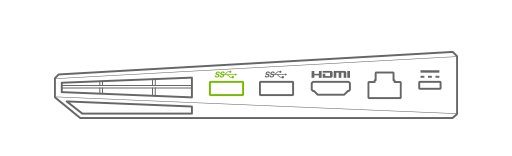
24.1 A Través De La Red Local
El dispositivo SHIELD TV puede ser detectable como dispositivo conectado en red.
- Habilita Configuración > Preferencias del dispositivo > Almacenamiento > Transferir archivos a través de la red local.
- La siguiente página tendrá la información necesaria para iniciar sesión en tu SHIELD TV para transferir archivos dentro y fuera del almacenamiento.
25. Controlar SHIELD TV Con Google Home
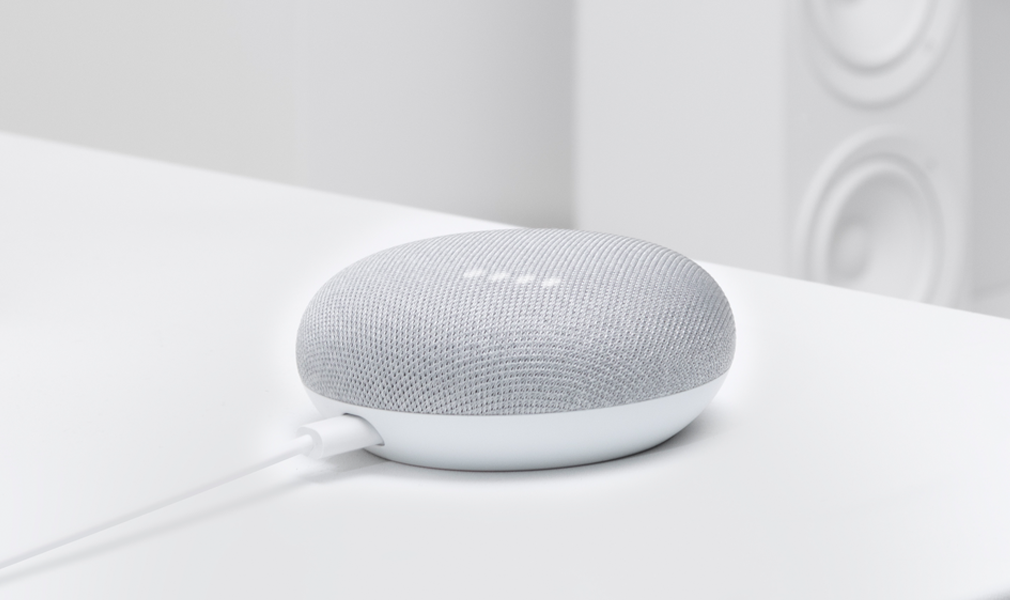
Inicia sesión en la misma cuenta de Google en tu Google Home como lo haces con tu SHIELD TV para controlar el televisor manos libres.
Comandos básicos
"Encender [SHIELD]"
"Apagar [SHIELD]"
"Abrir [nombre de la aplicación] en [SHIELD]"
Características de reproducción
"Reproducir [nombre de Netflix, HBO NOW, CBS, Viki, o Show Starz] en [SHIELD]"
"Reproducir [nombre de la canción] en [nombre de la aplicación] en [SHIELD]"
"Ver [nombre del canal] en YouTube TV en [SHIELD]"
"Reproducir [título de vídeo] en YouTube en [SHIELD]"
"Pausa en [SHIELD]"
"Reproducir en [SHIELD]"
Fotos y Smart Home
"Muéstrame mis fotos de Egipto en [SHIELD]"
"Muéstrame mis fotos del fin de semana pasado en [SHIELD]"
"Atenúa las luces"
"Ajusta la temperatura a 72 grados"
| NOTA: | Cambia el nombre de tu [SHIELD] yendo a Configuración > Preferencias del dispositivo > Acerca de > Nombre del dispositivo |
26. Controlar SHIELD Con Alexa Y Amazon Echo

Empareja tu SHIELD con un dispositivo Amazon Echo para lanzar aplicaciones, activar o desactivar SHIELD o incluso controlar la reproducción.
Localiza la capacidad NVIDIA SHIELD TV en la aplicación Alexa de tu dispositivo móvil y sigue las instrucciones.
Comandos de voz que funcionan actualmente, con más en camino:
Empezar
"Alexa, enciende SHIELD".
"Alexa, apaga SHIELD".
Apertura de aplicaciones de entretenimiento
"Alexa, abre Prime Video (en SHIELD)".
"Alexa, abre HBO NOW (en SHIELD)".
Uso de controles multimedia
"Alexa, pausa (en SHIELD)".
"Alexa, juega (en SHIELD)".
"Alexa, siguiente (en SHIELD)".
"Alexa, anterior (en SHIELD)".
"Alexa, avance rápido diez minutos (en SHIELD)".
Navegación por SHIELD
"Alexa, vete a la configuración (en SHIELD)".
"Alexa, vete al escritorio (en SHIELD)".
"Alexa, vete a la configuración de control (en SHIELD)."
27. NVIDIA GeForce NOW for SHIELD TV
La aplicación NVIDIA GeForce NOW for SHIELD TV hace que resulte fácil encontrar todos los juegos que puedes jugar en tu SHIELD TV.

28. Aplicación De Mando a Distancia SHIELD TV
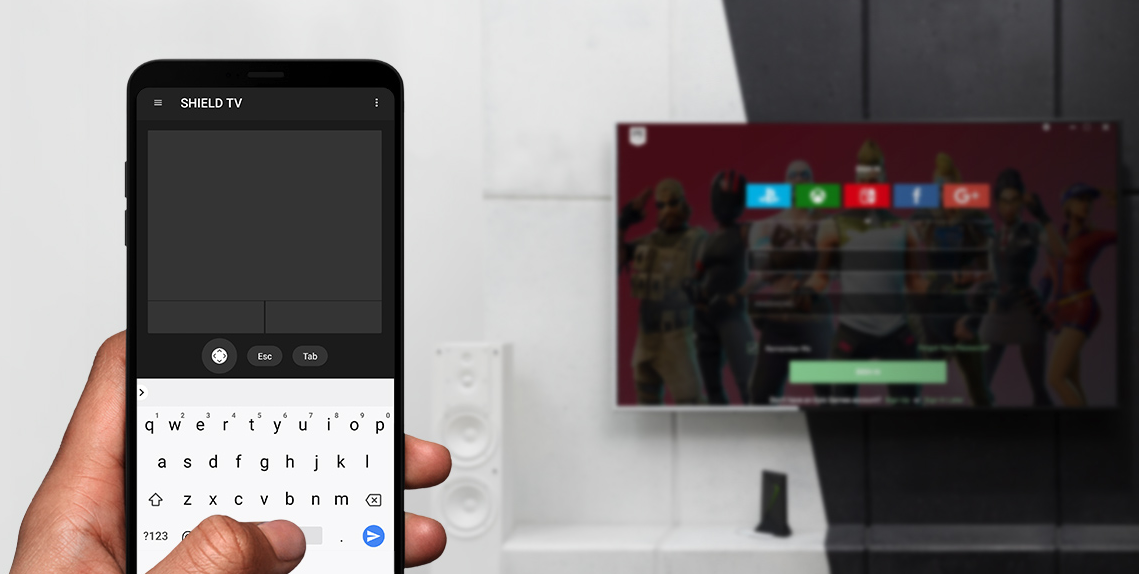
La aplicación NVIDIA SHIELD TV te permite controlar tu dispositivo SHIELD TV, iniciar aplicaciones e iniciar sesión en tus juegos de GeForce NOW favoritos en SHIELD incluso más rápidamente.
La aplicación te proporciona acceso instantáneo a un ratón y un teclado virtuales, lo que te facilita la especificación de tu nombre de usuario y contraseña en servicios de juegos.
Características
Controles de GeForce NOW
- Ratón virtual
- Teclado virtual (Español)
Controles del mando a distancia SHIELD TV
- Lanzador de aplicaciones: toca en el banner de la aplicación para iniciar inmediatamente la aplicación en SHIELD TV
- Navegación de cruceta (arriba, abajo, derecha e izquierda) y Seleccionar
- Botones de Android (Atrás, Iniciar, Escritorio)
- Reproducción multimedia (Reproducir, Pausar, Avance rápido, Rebobinado)
- Control de volumen
Instrucciones De Configuración
- Instala la aplicación SHIELD TV en tu dispositivo Android o iOS
- Conecta tu teléfono a la misma red que tu SHIELD TV
- Inicia la aplicación SHIELD TV y selecciona tu SHIELD en los dispositivos detectados
- Empareja tu dispositivo con SHIELD TV introduciendo el código de 6 dígitos que se muestra en tu televisor
29. Cliente Plex Y PLEX Media Server

PLEX es el servidor multimedia más popular disponible. Con PLEX en SHIELD TV, los usuarios pueden alojar y acceder a sus propios elementos multimedia (películas, música, fotos), desde prácticamente cualquier lugar donde haya una conexión a Internet disponible. Sigue este enlace para obtener más información sobre PLEX y PLEX Media Server.
SHIELD TV viene con el cliente PLEX y PLEX Media Server preinstalados.
29.1 Cliente PLEX
Con el cliente PLEX, puedes acceder al contenido enviado desde cualquier dispositivo PLEX Media Server existente, tanto si se ejecuta en un PC, un NAS independiente con PLEX Media Server habilitado o en tu NVIDIA SHIELD TV.
Configuración del cliente PLEX en SHIELD
- En un navegador web, busca https://www.plex.tv/link
- Inicia la aplicación PLEX en tu SHIELD TV
- Sigue las instrucciones en pantalla para completar el proceso de vinculación
- En la configuración del cliente, especifica el servidor PLEX desde el que quieres acceder a los elementos multimedia
29.2 PLEX Media Server
PLEX Media Server en SHIELD TV es compatible con las funciones más avanzadas del servidor PLEX en un dispositivo de streaming de baja potencia (<10 W).
Las características avanzadas del servidor PLEX incluyen:
- Transcodificación A/V de hardware en tiempo real
- Medios de lectura/escritura en una amplia variedad de soluciones que incluyen
- Unidades USB conectadas
- Almacenamiento accesible en red (NAS)
- En el almacenamiento SHIELD del dispositivo
- Televisor de transmisión en directo*
- Grabación y transmisión de programación local a través de antena en un almacenamiento conectado o en red*
- Copia de seguridad automática de fotos y películas desde dispositivos móviles con iOS y Android**
*Requiere sintonizador digital y antena y cuenta habilitada para Plex Pass. Para obtener más información sobre la configuración de PLEX LIVE TV o DVR en SHIELD, sigue este enlace.
** **Requiere una cuenta habilitada para Plex Pass
Configuración de PLEX Media Server en SHIELD
- Sigue las instrucciones para configurar el cliente PLEX en SHIELD, asegurándote de marcar la opción "Habilitar Plex Media Server"
- Una vez que el cliente está configurado, desde un PC, teléfono o tableta, abre la aplicación web PLEX (http://app.plex.tv). Nota: El dispositivo debe estar en la misma red que el dispositivo SHIELD.
- En Servidores, busca el nuevo servidor SHIELD Android TV disponible
- En el navegador web sigue las instrucciones para completar la configuración
Para obtener información adicional sobre PLEX Media Server en SHIELD, sigue este enlace
30. Solución De Problemas De SHIELD
Antes de usar esta guía de solución de problemas, asegúrate de que SHIELD está actualizado con la última actualización del sistema, disponible automáticamente si SHIELD está conectado a Internet.
Si no puedes resolver los problemas que estás teniendo con los pasos de solución de problemas de esta guía, puedes encontrar una resolución en la sección Foros de experiencia de GeForce > SHIELD.
También se pueden encontrar consejos y trucos útiles en SHIELD FAQ y nuestra Página de soporte de SHIELD.
Si sigues sin poder resolver el problema, ponte en contacto con el servicio de atención al cliente de NVIDIA.
SHIELD TV Pro Legal
31. Health and Safety Information
Important Safety Information
NVIDIA products are designed to operate safely when installed and used according to the product instructions and general safety practices. The guidelines included in this document explain the potential risks associated with equipment operation and provide important safety practices designed to minimize these risks. By carefully following the information contained in this document you can protect yourself from hazards and create a safer environment.
This product is designed and tested to meet IEC-60950-1, the Standard for Safety of Information Technology Equipment. This also covers the national implementation of IEC-60950-1 based safety standards around the world e.g. UL-60950-1. These standards reduce the risk of injury from the following hazards:
- Electric shock: Hazardous voltage levels contained in parts of the product
- Fire: Overload, temperature, material flammability
- Mechanical: Sharp edges, moving parts, instability
- Energy: Circuits with high energy levels (240 volt-amps) or potential as burn hazards
- Heath: Accessible parts of the product at high temperatures
- Chemical: Chemical fumes and vapors
- Radiation: Noise, ionizing, laser, ultrasonic waves
Retain and follow all product safety and operating instructions. Always refer to the documentation supplied with your equipment. Observe all warnings on the product and in the operating instructions.
| Note: | Read all safety information below and operating instructions before using the SHIELD to avoid injury. |
 WARNING: FAILURE TO FOLLOW THESE SAFETY INSTRUCTIONS COULD RESULT IN FIRE, ELECTRIC SHOCK OR OTHER INJURY OR DAMAGE.
ELECTRICAL EQUIPMENT CAN BE HAZARDOUS IF MISUSED. OPERATION OF THIS PRODUCT, OR SIMILAR PRODUCTS, MUST ALWAYS BE SUPERVISED BY AN ADULT. DO NOT ALLOW CHILDREN ACCESS TO THE INTERIOR OF ANY ELECTRICAL PRODUCT AND DO NOT PERMIT THEM TO HANDLE ANY CABLES.
To reduce the risk of bodily injury, electric shock, fire, and damage to the equipment, observe the safety labels included on the equipment.
Symbols on Equipment
This symbol in conjunction with any of the following symbols indicates the presence of a potential hazard. The potential for injury exists if warnings are not observed. Consult your documentation for specific details.
 This symbol indicates the presence of hazardous energy circuits or electric shock hazards. Refer all servicing to qualified personnel.
WARNING: To reduce the risk of injury from electric shock hazards, do not open this enclosure. Refer all maintenance, upgrades, and servicing to qualified personnel.
 This symbol indicates the presence of electric shock hazards. The area contains no user or field serviceable parts. Do not open for any reason.
General Precautions
To reduce the risk of electric shock, personal injury, or damage to the equipment, observe the following precautions:
- Follow all cautions and instructions marked on the equipment.
- Do not bend, drop, crush, puncture, incinerate, or push objects into openings of the device.
- Do not connect or disconnect any cables or perform maintenance or reconfiguration of this product during an electrical storm.
- Do not use the SHIELD TV in rain or near sink, or other wet locations. Take care not to spill any food or liquid into the device. In case the SHIELD device gets wet, unplug all cables and turn off before cleaning, and allow it to dry thoroughly before turning it on again.
- Do not expose the SHIELD TV to any gas which is not normally contained in the atmosphere. It may cause mis-operation or defects.
- Never turn on any equipment when there is evidence of fire, water, or structural damage.
- Place the product away from radiators, heat registers, stoves, amplifiers, or other appliances that produce heat.
- Never force a connector into a port. Check for obstructions on the port. If the connector and port don't join with reasonable ease, they probably don't match. Make sure that the connector matches the port and that you have positioned the connector correctly in relation to the port.
- Operate the AC adapter in a ventilated area.
- When you are using the NVIDIA SHIELD TV, it is normal for the system and/or AC power adapter to get warm.
- Do not use conductive tools that could bridge live parts.
- Do not make mechanical or electrical modifications to the equipment.
- Never attempt to reconnect the SHIELD TV yourself. This device does not contain any user-serviceable parts. Do not attempt to open, disassemble, or remove the battery. You run the risk of electric shock.
- Operate the SHIELD TV in a place where the temperature is always between 5 and 30°C (41 to 86°F).
- Store the SHIELD TV in a place where the temperature is always between 0 and 35°C (32 to 95°F) with relative humidity of 70% or lower. When taking the device from a low temperature condition, allow the device to reach room temperature before turning the power on.
- Use this product only with approved equipment and/or accessories
- If the product sustains damage requiring service, disconnect the product from the AC electrical outlet and refer servicing to an NVIDIA authorized service provider.
Proposition 65 WARNING: This product contains chemicals known to the State of California to cause cancer and birth defects or other reproductive harm. (California law requires this warning be provided to California customers.
A lire avant toute utilisation d'un jeu vidéo par vous-même ou par votre enfant.
I. - Précautions à prendre dans tous les cas pour l'utilisation d'un jeu vidéo.
Evitez de jouer si vous êtes fatigué ou si vous manquez de sommeil.
Assurez-vous que vous jouez dans une pièce bien éclairée en modérant la luminosité de votre écran.
Lorsque vous utilisez un jeu vidéo susceptible d'être connecté à un écran, jouez à bonne distance de cet écran de télévision et aussi loin que le permet le cordon de raccordement.
En cours d'utilisation, faites des pauses de dix à quinze minutes toutes les heures.
II. - Avertissement sur l'épilepsie.
Certaines personnes sont susceptibles de faire des crises d'épilepsie comportant, le cas échéant, des pertes de conscience à la vue, notamment, de certains types de stimulations lumineuses fortes: succession rapide d'images ou répétition de figures géométriques simples, d'éclairs ou d'explosions. Ces personnes s'exposent à des crises lorsqu'elles jouent à certains jeux vidéo comportant de telles stimulations, alors même qu'elles n'ont pas d'antécédent médical ou n'ont jamais été sujettes elles-mêmes à des crises d'épilepsie.
Si vous-même ou un membre de votre famille avez déjà présenté des symptômes liés à l'épilepsie (crise ou perte de conscience) en présence de stimulations lumineuses, consultez votre médecin avant toute utilisation.
Les parents se doivent également d'être particulièrement attentifs à leurs enfants lorsqu'ils jouent avec des jeux vidéo. Si vous-même ou votre enfant présentez un des symptômes suivants : vertige, trouble de la vision, contraction des yeux ou des muscles, trouble de l'orientation, mouvement involontaire ou convulsion, perte momentanée de conscience, il faut cesser immédiatement de jouer et consulter un médecin.
Power Rating
19 V DC, 2.1 A
32. SHIELD TV Compliance
The SHIELD Android TV Game Console is compliant with the regulations listed in this section.
United States
Federal Communications Commission (FCC)

FCC ID: VOB-P3430
This device complies with Part 15 of the FCC Rules. Operation is subject to the following two conditions: (1) this device may not cause harmful interference, and (2) this device must accept any interference received, including any interference that may cause undesired operation of the device.
This equipment has been tested and found to comply with the limits for a Class B digital device, pursuant to Part 15 of the FCC Rules. These limits are designed to provide reasonable protection against harmful interference in a residential installation. This equipment generates, uses and can radiate radio frequency energy and, if not installed and used in accordance with the instructions, may cause harmful interference to radio communications. However, there is no guarantee that interference will not occur in a particular installation.
If this equipment does cause harmful interference to radio or television reception, which can be determined by turning the equipment off and on, the user is encouraged to try to correct the interference by one or more of the following measures:
- Reorient or relocate the receiving antenna.
- Increase the separation between the equipment and receiver.
- Connect the equipment into an outlet on a circuit different from that to which the receiver is connected.
- Consult the dealer or an experienced radio/TV technician for help.
FCC Warning: The FCC requires that you be notified that any changes or modifications to this device not expressly approved by the manufacturer could void the user's authority to operate the equipment.
RF Radiation Exposure Statement:
SHIELD Android TV Game Console has been tested and complies with FCC RF radiation exposure limits set forth for an uncontrolled environment when used with the NVIDIA accessories supplied or designated for this product. During testing, SHIELD was placed in positions that simulate use against the body. The use of any other accessories may not ensure compliance with FCC RF exposure guidelines.
This equipment must be installed and operated in accordance with provided instructions and the antenna(s) used for this transmitter must be installed to provide a separation distance of at least 20 cm from all persons and must not be co-located or operating in conjunction with any other antenna or transmitter. End-users and installers must be provided with antenna installation instructions and consider removing the no-collocation statement.
Underwriters Laboratories (UL)

I.T.E. E204896
Canada
Innovation, Science and Economic Development Canada (ISED)
IC: 7361A-P3430
CAN ICES-3(B)/NMB-3(B)
This device contains licence-exempt transmitter(s)/receiver(s) that comply with Innovation, Science and Economic Development Canada's licence-exempt RSS(s). Operation is subject to the following two conditions: (1) this device may not cause interference, and (2) this device must accept any interference, including interference that may cause undesired operation of the device.
Le présent appareil est conforme aux CNR d'Innovation, Sciences et Développement économique Canada applicables aux appareils radio exempts de licence. L'exploitation est autorisée aux deux conditions suivantes: (1) l'appareil ne doit pas produire de brouillage, et (2) l'utilisateur de l'appareil doit accepter tout brouillage radioélectrique subi, même si le brouillage est susceptible d'en compromettre le fonctionnement.
Caution: Operation in the band 5150-5250 MHz is only for indoor use to reduce the potential for harmful interference to co-channel mobile satellite systems. Be advised that high-power radars are allocated as primary users of the bands 5250-5350 MHz and 5650-5850 MHz and that these radars could cause interference and/or damage to LE-LAN devices.
Attention: les dispositifs fonctionnant dans la bande de 5 150 à 5 250 MHz sont réservés uniquement pour une utilisation à l'intérieur afin de réduire les risques de brouillage préjudiciable aux systèmes de satellites mobiles utilisant les mêmes canaux
Être informé des radars à haute puissance sont alloués principaux utilisateurs de bandes 5250 à 5350 MHz et 5850 MHz, à 5650 et que ces radars pourraient provoquer des interférences et / ou endommager les appareils RL-EL. radars à haute puissance sont alloués utilisateurs primaires des bandes 5250 à 5350 MHz et 5850 MHz, ce à 5650 et que ces radars pourraient provoquer des interférences et / ou endommager les périphériques RL-EL.
RF Radiation Exposure Statement:
SHIELD Android TV Game Console has been tested and complies with IC RSS 102 RF radiation exposure limits set forth for an uncontrolled environment when used with the NVIDIA accessories supplied or designated for this product. During testing, SHIELD was placed in positions that simulate use against the body. The use of any other accessories may not ensure compliance with IC RSS 102 RF exposure guidelines.
This transmitter must not be co-located or operating in conjunction with any other antenna or transmitter. This equipment should be installed and operated with a minimum distance of 20 centimeters between the radiator and your body.
Déclaration d'exposition aux radiations:
SHIELD Android TV Game Console a ete testee conformemment aux normes d'exposition d'emission RF de la IC RSS 102 pour un environement non controle lors d'utilisation avec les accessoires fournis or recommendes par NVIDIA. Pendant les tests, SHIELD a ete positionnee afin de simule la presence du corps humain. L'utilisation d'accessoires autres que ceux recommendes par NVIDIA ne guarantis pas la compatibilite avec les normes d'emission RF de la IC RSS 102.
Cet émetteur ne doit pas être Co-placé ou ne fonctionnant en même temps qu'aucune autre antenne ou émetteur. Cet équipement devrait être installé et actionné avec une distance minimum de 20 centimètres entre le radiateur et votre corps.
European Union
European Conformity; Conformité Européenne (CE)


This device complies with the following Directives:
- Radio Equipment Directive 2014/53/EU
- RoHS Directive 2011/65/EU
- Energy-related Products Directive (ErP) 2009/125/EC
The full text of EU declaration of conformity is available at the following internet address: www.nvidia.com/support
A copy of the Declaration of Conformity to the essential requirements may be obtained directly from NVIDIA GmbH (Bavaria Towers – Blue Tower, Einsteinstrasse 172, D-81677 Munich, Germany).
This device operates in the following frequency bands and maximum transmitted power:
Frequency Band |
Max. EIRP(dBm) |
Max. EIRP(mW) |
2400.0 - 2483.5 MHz |
20.0 |
100 |
5150.0 - 5350.0 MHz |
23.0 |
200 |
5470.0 - 5725.0 MHz |
23.0 |
200 |
5725.0 - 5875.0 MHz |
14.0 |
25 |
Warning:
- Operation in the 5150 - 5350 MHz frequency band is restricted to Indoor Use Only.
- This equipment should be installed and operated with a minimum distance of 20 centimeters between the radiator and your body.
- Any changes or modifications to this device not expressly approved by the manufacturer could void the user's authority to operate the equipment.
A LIRE AVANT TOUTE UTILISATION D'UN JEU VIDEO PAR VOUS-MEME OU PAR VOTRE ENFANT
I. - Précautions à prendre dans tous les cas pour l'utilisation d'un jeu vidéo.
Evitez de jouer si vous êtes fatigué ou si vous manquez de sommeil.
Assurez-vous que vous jouez dans une pièce bien éclairée en modérant la luminosité de votre écran.
Lorsque vous utilisez un jeu vidéo susceptible d'être connecté à un écran, jouez à bonne distance de cet écran de télévision et aussi loin que le permet le cordon de raccordement.
En cours d'utilisation, faites des pauses de dix à quinze minutes toutes les heures.
II. - Avertissement sur l'épilepsie.
Certaines personnes sont susceptibles de faire des crises d'épilepsie comportant, le cas échéant, des pertes de conscience à la vue, notamment, de certains types de stimulations lumineuses fortes: succession rapide d'images ou répétition de figures géométriques simples, d'éclairs ou d'explosions. Ces personnes s'exposent à des crises lorsqu'elles jouent à certains jeux vidéo comportant de telles stimulations, alors même qu'elles n'ont pas d'antécédent médical ou n'ont jamais été sujettes elles-mêmes à des crises d'épilepsie. Si vous-même ou un membre de votre famille avez déjà présenté des symptômes liés à l'épilepsie (crise ou perte de conscience) en présence de stimulations lumineuses, consultez votre médecin avant toute utilisation. Les parents se doivent également d'être particulièrement attentifs à leurs enfants lorsqu'ils jouent avec des jeux vidéo. Si vous-même ou votre enfant présentez un des symptômes suivants : vertige, trouble de la vision, contraction des yeux ou des muscles, trouble de l'orientation, mouvement involontaire ou convulsion, perte momentanée de conscience, il faut cesser immédiatement de jouer et consulter un médecin.
Australia and New Zealand
Australian Communications and Media Authority

This product meets the applicable EMC requirements for Class B, I.T.E equipment and applicable radio equipment requirements.
This product meets the applicable requirements for telecommunications equipment and can legally be connected to a telecommunications network.
Japan
Voluntary Control Council for Interference (VCCI)


Radio/Telecommunications Certification
W52/ W53は屋内使用限定
Japan RoHS Material Content Declaration
日本工業規格JIS C 0950:2008により、2006年7月1日以降に販売される特定分野の電気および電子機器について、製造者による含有物質の表示が義務付けられます。 |
||||||
主な分類 |
特定化学物質記号 |
|||||
Pb |
Hg |
Cd |
Cr(VI) |
PBB |
PBDE |
|
メディアストリームコンソール |
除外項目 |
0 |
0 |
0 |
0 |
0 |
電源 |
除外項目 |
0 |
0 |
0 |
0 |
0 |
ケーブル/コネクター |
除外項目 |
0 |
0 |
0 |
0 |
0 |
プロセッサー |
除外項目 |
0 |
0 |
0 |
0 |
0 |
システムメモリ |
除外項目 |
0 |
0 |
0 |
0 |
0 |
プリント基板 |
除外項目 |
0 |
0 |
0 |
0 |
0 |
機械部品 |
除外項目 |
0 |
0 |
0 |
0 |
0 |
はんだ付け材料 |
0 |
0 |
0 |
0 |
0 |
0 |
フラックス、クリームはんだ、ラベル、その他消耗品 |
0 |
0 |
0 |
0 |
0 |
0 |
注: 1.「0」は、特定化学物質の含有率が日本工業規格JIS C 0950:2008に記載されている含有率基準値より低いことを示します。 |
||||||
A Japanese regulatory requirement, defined by specification JIS C 0950: 2008, mandates that manufacturers provide Material Content Declarations for certain categories of electronic products offered for sale after July 1, 2006. |
||||||
Major Classification |
Symbols of Specified Chemical Substance |
|||||
Pb |
Hg |
Cd |
Cr(VI) |
PBB |
PBDE |
|
Media Streaming Console |
Exempt |
0 |
0 |
0 |
0 |
0 |
Power adapter |
Exempt |
0 |
0 |
0 |
0 |
0 |
Cables/Connectors |
Exempt |
0 |
0 |
0 |
0 |
0 |
Processor |
Exempt |
0 |
0 |
0 |
0 |
0 |
System memory |
Exempt |
0 |
0 |
0 |
0 |
0 |
PCA |
Exempt |
0 |
0 |
0 |
0 |
0 |
Mechanicals |
Exempt |
0 |
0 |
0 |
0 |
0 |
Soldering material |
0 |
0 |
0 |
0 |
0 |
0 |
Flux, Solder Paste, label and other consumable materials |
0 |
0 |
0 |
0 |
0 |
0 |
Notes: 1. "0" indicates that the level of the specified chemical substance is less than the threshold level specified in the standard, JIS C 0950: 2008. |
||||||
South Korea
Radio Research Agency (RRA)
Korean Agency for Technology and Standards (KATS)

R-R-NVA-P3430
B급 기기 |
이 기기는 가정용(B급) 전자파적합기기로서 주 |
(가정용 방송 통신기자재) |
로 가정에서 사용하는 것을 목적으로 하며, 모 |
|
든 지역에서 사용할 수 있습니다. |
Korea RoHS Material Content Declaration
확인 및 평가 양식은 제품에 포함 된 유해 물질의 허용 기준의 준수에 관한 |
|||||||
문 준비 |
상호 : |
앤비디아홍콩홀딩즈리미티드( 영업소) |
법인등록번호 |
110181-0036373 |
|||
대표자성명 |
카렌테레사번즈 |
사업자등록번호: |
120-84-06711 |
||||
주소 |
서울특별시 강남구 영동대로 511, 2101호 ( 삼성동, 코엑스무역타워) |
||||||
제품 내용 |
|||||||
제품의 종류 |
해당없음 |
제품명(규격) |
해당없음 |
||||
세부모델명(번호): |
해당없음 |
제품출시일 |
해당없음 |
||||
제품의 중량 |
해당없음 |
제조, 수입업자 |
앤비디아 |
||||
엔비디아의 그래픽 카드제품은 전기 전자제품 및 자동차의 자원순환에 관한 법률 시행령 제 11조 제 1항에 의거한 법 시행행규칙 제 3조에에따른 유해물질함유 기준을 확인 및 평가한 결과, 이를 준수하였음을 공표합니다. |
|||||||
구비서류 : 없음 ① 제품의 종류는 "전기.전자제품 및 자동차의 자원순환에관한 법률 시행령" 제 8조 제 1항 및 제 2항에 따른 품목별로 구분하여 기재합니다. |
|||||||
Confirmation and Evaluation Form Concerning the Adherence to Acceptable Standards of Hazardous Materials Contained in Products |
|||||||
Statement Prepared by |
Company Name: |
Nvidia HongKong Holding Ltd.Korea branch |
Corporate Identification Number: |
110181-0036373 |
|||
Name of Company Representative: |
Karen Theresa Burns |
Business Registration Number: |
120-84-06711 |
||||
Address |
2788 San Tomas Expressway, Santa Clara, CA 95051 |
||||||
Product Information |
|||||||
Product Category: |
N/A |
Name of Product: |
N/A |
||||
Detailed Product Model Name (Number): |
N/A |
Date of first market release: |
N/A |
||||
Weight of Product: |
N/A |
Manufacturer and/or Importer: |
NVIDIA Corporation |
||||
This for is publicly certify That NVIDIA Company has undergone the confirmation and evaluation procedures for the acceptable amounts of hazardous materials contained in graphic card according to the regulations stipulated in Article 3 of the 'Status on the Recycling of Electrical and Electronic Products, and Automobiles' and that company has graphic card adhered to the Enforcement Regulations of Article 11, Item 1 of the statute. |
|||||||
Attachment: None ① Please indicate the product category according to the categories listed in Article 8, Items 1and 2 of the ' Enforcement Ordinance of the Statute on the Recycling of Electrical, Electronic and Automobile Materials' |
|||||||
Taiwan
National Communications Commission

注意!
依據 低功率電波輻射性電機管理辦法
第十二條
經型式認證合格之低功率射頻電機,非經許可,公司、商號或使用者均不得擅自變更頻率、加大功率或變更原設計之特性及功能。
第十四條
低功率射頻電機之使用不得影響飛航安全及干擾合法通信;經發現有干擾現象時,應立即停用,並改善至無干擾時方得繼續使用。
前項合法通信,指依電信法規定作業之無線電通信。
低功率射頻電機須忍受合法通信或工業、科學及醫療用電波輻射性電機設備之干擾。
應避免影響附近雷達系統之操作。
高增益指向性天線只得應用於固定式點對點系統。
Taiwan RoHS Material Content Declaration
限用物質含有情况標示聲明書 |
||||||
單元 |
限用物質及其化學符號 |
|||||
铅 |
汞 |
镉 |
六價铬 |
多溴聯苯 |
多溴二苯醚 |
|
媒體流控制台 |
- |
0 |
0 |
0 |
0 |
0 |
電源設備 |
- |
0 |
0 |
0 |
0 |
0 |
線材 |
- |
0 |
0 |
0 |
0 |
0 |
處理器 |
- |
0 |
0 |
0 |
0 |
0 |
存儲設備 |
- |
0 |
0 |
0 |
0 |
0 |
印刷電路部件 |
- |
0 |
0 |
0 |
0 |
0 |
機械部件 |
- |
0 |
0 |
0 |
0 |
0 |
焊接金屬 |
0 |
0 |
0 |
0 |
0 |
0 |
助焊劑,錫膏,標籤及耗材 |
0 |
0 |
0 |
0 |
0 |
0 |
備考1:O:系指該限用物質未超出百分比含量基準值 |
||||||
Russia/Kazakhstan/Belarus
Customs Union Technical Regulations (CU TR)

This device complies with the technical regulations of the Customs Union (CU TR)
ТЕХНИЧЕСКИЙ РЕГЛАМЕНТ ТАМОЖЕННОГО СОЮЗА О безопасности низковольтного оборудования (ТР ТС 004/2011)
ТЕХНИЧЕСКИЙ РЕГЛАМЕНТ ТАМОЖЕННОГО СОЮЗА
Электромагнитная совместимость технических средств (ТР ТС 020/2011)
Federal Agency of Communication (FAC)
This device complies with the rules set forth by Federal Agency of Communications and the Ministry of Communications and Mass Media
Federal Security Service notification has been filed.
Singapore
Infocomm Media Development Authority of Singapore (IMDA)
Bluetooth

Declaration ID: D046888
Wi-Fi Alliance®
Wi-Fi CERTIFIED™
Certification ID: WFA91178
33. SHIELD Controller 2017 Compliance
The SHIELD Controller 2017 is compliant with the regulations listed in this section.
United States
Federal Communications Commission (FCC)
FCC ID: VOB-P2920
This device complies with Part 15 of the FCC Rules. Operation is subject to the following two conditions: (1) this device may not cause harmful interference, and (2) this device must accept any interference received, including interference that may cause undesired operation.
This equipment has been tested and found to comply with the limits for a Class B digital device, pursuant to Part 15 of the FCC Rules. These limits are designed to provide reasonable protection against harmful interference in a residential installation. This equipment generates, uses and can radiate radio frequency energy and, if not installed and used in accordance with the instructions, may cause harmful interference to radio communications. However, there is no guarantee that interference will not occur in a particular installation. If this equipment does cause harmful interference to radio or television reception, which can be determined by turning the equipment off and on, the user is encouraged to try to correct the interference by one or more of the following measures:
- Reorient or relocate the receiving antenna.
- Increase the separation between the equipment and receiver.
- Connect the equipment into an outlet on a circuit different from that to which the receiver is connected.
- Consult the dealer or an experienced radio/TV technician for help.
FCC Warning: The FCC requires that you be notified that any changes or modifications to this device not expressly approved by the manufacturer could void the user’s authority to operate the equipment.
RF Radiation Exposure Statement:
NVIDIA SHIELD Controller 2017 has been tested and complies with FCC RF radiation exposure limits set forth for an uncontrolled environment when used with the NVIDIA accessories supplied or designated for this product. During testing, the SHIELD was placed in positions that simulate use against the body. The use of any other accessories may not ensure compliance with FCC RF exposure guidelines.
California Energy Commission

This product meets the applicable energy efficiency requirements for a battery charging system.
Underwriters Laboratories (UL)
I.T.E. E204896
Canada
Industry Canada (IC)
IC: 7361A-P2920
CAN ICES-3(B)/NMB-3(B)
This device complies with Industry Canada license-exempt RSS standard(s). Operation is subject to the following two conditions: (1) this device may not cause interference, and (2) this device must accept any interference, including interference that may cause undesired operation of the device.
Le présent appareil est conforme aux CNR d'Industrie Canada applicables aux appareils radio exempts de licence. L'exploitation est autorisée aux deux conditions suivantes : (1) l'appareil ne doit pas produire de brouillage, et (2) l'utilisateur de l'appareil doit accepter tout brouillage radioélectrique subi, même si le brouillage est susceptible d'en compromettre le fonctionnement.
The device meets the exemption from the routine evaluation limits in section 2.5 of RSS 102 and compliance with RSS-102 RF exposure, users can obtain Canadian information on RF exposure and compliance.
Le dispositif rencontre l'exemption des limites courantes d'évaluation dans la section 2.5 de RSS 102 et la conformité à l'exposition de RSS-102 rf, utilisateurs peut obtenir l'information canadienne sur l'exposition et la conformité de rf.
European Union
European Conformity
Conformité Européenne (CE)
This device bears the CE mark in accordance with Directive 2014/53/EU
This device complies with the following Directives:
- Radio Equipment Directive for radio equipment
- RoHS Directive for hazardous substances
The full text of EU declaration of conformity is available at the following internet address: https://images.nvidia.com/shieldwebsite/visuals/public/DoC/EN/SHIELD_Controller_P2920_DoC_EN.pdf
This device operates in the following frequency bands and maximum transmitted power:
Frequency Band |
Max. EIRP(dBm) |
Max. EIRP(mW) |
2402.0 - 2480.0 MHz |
9.84 |
9.64 |
Warning:
- Any changes or modifications to this device not expressly approved by the manufacturer could void the user’s authority to operate the equipment.
Hardware version: 699-12922-xxxx-xxx; Software version: v1.xx.
Australia and New Zealand
Australian Communications and Media Authority
This product meets the applicable EMC requirements for Class B, I.T.E equipment and applicable radio equipment requirements.
Japan
Voluntary Control Council for Interference (VCCI)
This is a Class B product based on the standard of the VCCI Council. If this is used near a radio or television receiver in a domestic environment, it may cause radio interference. Install and use the equipment according to the instruction manual.
Radio/Telecommunications Certification
South korea
Korea Certification (KC)

상호 : NVIDIA CORPORATION
기자재 명칭: SHIELD Controller
모델명: P2920
제조년월일 : 2016/07
해당무선기기는 운용중 전파혼신 가능성이 있음
Class B Equipment (For Home Use Broadcasting & Communication Equipment)
B급 기기 (가정용 방송통신기자재)
This equipment is home use (Class B) electromagnetic wave suitability equipment and to be used mainly at home and it can be used in all areas.
이 기기는 가정용(B급) 전자파적합기기로서 주 로 가정에서 사용하는 것을 목적으로 하며, 모 든 지역에서 사용할 수 있습니다.
China
State Radio Regulation of China (SRRC)
CMIIT ID: 2016DP3727
China RoHS Material Content Declaration

产品中有害物质的名称及含量 |
||||||
部件名称 |
有害物质 |
|||||
铅 |
汞 |
镉 |
六价铬 |
多溴联苯 |
多溴二苯醚 |
|
游戏手柄 Game controller |
X |
O |
O |
O |
O |
O |
印刷电路部件 PCA |
X |
O |
O |
O |
O |
O |
机械部件 Mechanicals |
O
|
O |
O |
O |
O |
O |
电池 Battery |
O
|
O |
O |
O |
O |
O |
焊接金属 Soldering material |
O |
O |
O |
O |
O |
O |
助焊剂,锡膏,标签及耗材 Flux, Solder Paste, label and other consumable materials |
O
|
O |
O |
O |
O |
O |
本表格依据SJ/T 11364-2014 的规定编制
此表中所有名称中含 “X” 的部件均符合欧盟 RoHS 立法。 |
||||||
Taiwan
National Communications Commission
注意!
依據 低功率電波輻射性電機管理辦法
第十二條
經型式認證合格之低功率射頻電機,非經許可,公司、商號或使用者均不得擅自變更頻率、加大功率或變更原設計之特性及功能。
第十四條
低功率射頻電機之使用不得影響飛航安全及干擾合法通信;經發現有干擾現象時,應立即停用,並改善至無干擾時方得繼續使用。
前項合法通信,指依電信法規定作業之無線電通信。
低功率射頻電機須忍受合法通信或工業、科學及醫療用電波輻射性電機設備之干擾。
India
Wireless Planning & Coordination Wing (WPC)
ETA CERTIFICATION NO: : NR-ETA-/4251
Russia/Kazakhstan/Belarus
EurAsian Customs Union
This device complies with the technical regulations of the Customs Union (CU TR)
This device complies with the rules set forth by Federal Agency of Communications and the Ministry of Communications and Mass Media
Federal Security Service notification has been filed.
Singapore
Infocomm Development Authority of Singapore (IDA)
Bluetooth
Bluetooth v4.1
Declaration ID: D031201
34. SHIELD Remote Compliance
The SHIELD Remote is compliant with the regulations listed in this section.
United States
Federal Communications Commission (FCC)
FCC ID: TX4-P3700
This device complies with part 15 of the FCC Rules. Operation is subject to the following two conditions: (1) this device may not cause harmful interference, and (2) this device must accept any interference received, including any interference that may cause undesired operation of the device.
This equipment has been tested and found to comply with the limits for a Class B digital device, pursuant to Part 15 of the FCC Rules. These limits are designed to provide reasonable protection against harmful interference in a residential installation. This equipment generates, uses and can radiate radio frequency energy and, if not installed and used in accordance with the instructions, may cause harmful interference to radio communications. However, there is no guarantee that interference will not occur in a particular installation.
If this equipment does cause harmful interference to radio or television reception, which can be determined by turning the equipment off and on, the user is encouraged to try to correct the interference by one or more of the following measures:
- Reorient or relocate the receiving antenna.
- Increase the separation between the equipment and receiver.
- Connect the equipment into an outlet on a circuit different from that to which the receiver is connected.
- Consult the dealer or an experienced radio/TV technician for help.
FCC Warning: The FCC requires that you be notified that any changes or modifications to this device not expressly approved by the manufacturer could void the user's authority to operate the equipment.
RF Radiation Exposure Statement:
NVIDIA SHIELD Remote has been tested and complies with FCC RF radiation exposure limits set forth for an uncontrolled environment when used with the NVIDIA accessories supplied or designated for this product. During testing, the SHIELD was placed in positions that simulate use against the body. The use of any other accessories may not ensure compliance with FCC RF exposure guidelines.
Underwriters Laboratories (UL)
I.T.E. E507112
Canada
Innovation, Science and Economic Development Canada (ISED)
IC: 11438A-P3700
CAN ICES-3(B)/NMB-3(B)
This device contains licence-exempt transmitter(s)/receiver(s) that comply with Innovation, Science and Economic Development Canada's licence-exempt RSS(s). Operation is subject to the following two conditions: (1) this device may not cause interference, and (2) this device must accept any interference, including interference that may cause undesired operation of the device.
Le présent appareil est conforme aux CNR d'Innovation, Sciences et Développement économique Canada applicables aux appareils radio exempts de licence. L'exploitation est autorisée aux deux conditions suivantes: (1) l'appareil ne doit pas produire de brouillage, et (2) l'utilisateur de l'appareil doit accepter tout brouillage radioélectrique subi, même si le brouillage est susceptible d'en compromettre le fonctionnement.
RF Radiation Exposure Statement:
SHIELD Remote has been tested and complies with IC RSS 102 RF radiation exposure limits set forth for an uncontrolled environment when used with the NVIDIA accessories supplied or designated for this product. During testing, SHIELD was placed in positions that simulate use against the body. The use of any other accessories may not ensure compliance with IC RSS 102RF exposure guidelines.
Déclaration d'exposition aux radiations:
SHIELD Remote a ete testee conformemment aux normes d'exposition d'emission RF de la IC RSS 102 pour un environement non controle lors d'utilisation avec les accessoires fournis or recommendes par NVIDIA. Pendant les tests, SHIELD a ete positionnee afin de simule la presence du corps humain. L'utilisation d'accessoires autres que ceux recommendes par NVIDIA ne guarantis pas la compatibilite avec les normes d'emission RF de la IC RSS 102.
European Union
European Conformity; Conformité Européenne (CE)

This device complies with the following Directives:
- Radio Equipment Directive 2014/53/EU
- RoHS Directive 2011/65/EU
The full text of EU declaration of conformity is available at the following internet address: www.nvidia.com/support
A copy of the Declaration of Conformity to the essential requirements may be obtained directly from NVIDIA GmbH (Bavaria Towers – Blue Tower, Einsteinstrasse 172, D-81677 Munich, Germany).
This device operates in the following frequency bands and maximum transmitted power:
Frequency Band |
Max. EIRP(dBm) |
Max. EIRP(mW) |
2402 - 2480 MHz |
10.7 |
11.75 |
Warning:
- Any changes or modifications to this device not expressly approved by the manufacturer could void the user's authority to operate the equipment.
Australia and New Zealand
Australian Communications and Media Authority
This product meets the applicable EMC requirements for Class B, I.T.E equipment and applicable radio equipment requirements.
This product meets the applicable requirements for telecommunications equipment and can legally be connected to a telecommunications network.
Japan
Voluntary Control Council for Interference (VCCI)
Radio/Telecommunications Certification
Japan RoHS Material Content Declaration
日本工業規格JIS C 0950:2008により、2006年7月1日以降に販売される特定分野の電気および電子機器について、製造者による含有物質の表示が義務付けられます。 |
||||||
主な分類 |
特定化学物質記号 |
|||||
Pb |
Hg |
Cd |
Cr(VI) |
PBB |
PBDE |
|
リモートコントロール |
除外項目 |
0 |
0 |
0 |
0 |
0 |
プリント基板 |
除外項目 |
0 |
0 |
0 |
0 |
0 |
機械部品 |
除外項目 |
0 |
0 |
0 |
0 |
0 |
電池 |
0 |
0 |
0 |
0 |
0 |
0 |
はんだ付け材料 |
0 |
0 |
0 |
0 |
0 |
0 |
フラックス、クリームはんだ、ラベル、その他消耗品 |
0 |
0 |
0 |
0 |
0 |
0 |
注: 1.「0」は、特定化学物質の含有率が日本工業規格JIS C 0950:2008に記載されている含有率基準値より低いことを示します。 |
||||||
A Japanese regulatory requirement, defined by specification JIS C 0950: 2008, mandates that manufacturers provide Material Content Declarations for certain categories of electronic products offered for sale after July 1, 2006. |
||||||
Major Classification |
Symbols of Specified Chemical Substance |
|||||
Pb |
Hg |
Cd |
Cr(VI) |
PBB |
PBDE |
|
Remote |
Exempt |
0 |
0 |
0 |
0 |
0 |
PCA |
Exempt |
0 |
0 |
0 |
0 |
0 |
Mechanical parts |
Exempt |
0 |
0 |
0 |
0 |
0 |
Battery |
0 |
0 |
0 |
0 |
0 |
0 |
Soldering material |
0 |
0 |
0 |
0 |
0 |
0 |
Flux, Solder Paste, label and other consumable materials |
0 |
0 |
0 |
0 |
0 |
0 |
Notes: 1. "0" indicates that the level of the specified chemical substance is less than the threshold level specified in the standard, JIS C 0950: 2008. |
||||||
South korea
Radio Research Agency (RRA)
Korean Agency for Technology and Standards (KATS)

R-R-RMB-P3700
B급 기기 (가정용 방송 통신기자재) |
이 기기는 가정용(B급) 전자파적합기기로서 주 로 가정에서 사용하는 것을 목적으로 하며, 모 든 지역에서 사용할 수 있습니다. |
Korea RoHS Material Content Declaration
확인 및 평가 양식은 제품에 포함 된 유해 물질의 허용 기준의 준수에 관한 |
|||||||
문 준비 |
상호 : |
앤비디아홍콩홀딩즈리미티드( 영업소) |
법인등록번호 |
110181-0036373 |
|||
대표자성명 |
카렌테레사번즈 |
사업자등록번호: |
120-84-06711 |
||||
주소 |
서울특별시 강남구 영동대로 511, 2101호 ( 삼성동, 코엑스무역타워) |
||||||
제품 내용 |
|||||||
제품의 종류 |
개인용 컴퓨터 |
제품명(규격) |
방패 |
||||
세부모델명(번호): |
해당없음 |
제품출시일 |
해당없음 |
||||
제품의 중량 |
해당없음 |
제조, 수입업자 |
앤비디아 |
||||
엔비디아의 그래픽 카드제품은 전기 전자제품 및 자동차의 자원순환에 관한 법률 시행령 제 11조 제 1항에 의거한 법 시행행규칙 제 3조에에따른 유해물질함유 기준을 확인 및 평가한 결과, 이를 준수하였음을 공표합니다. |
|||||||
구비서류 : 없음 ① 제품의 종류는 "전기.전자제품 및 자동차의 자원순환에관한 법률 시행령" 제 8조 제 1항 및 제 2항에 따른 품목별로 구분하여 기재합니다. |
|||||||
Confirmation and Evaluation Form Concerning the Adherence to Acceptable Standards of Hazardous Materials Contained in Products |
|||||||
Statement Prepared by |
Company Name: |
Nvidia HongKong Holding Ltd.Korea branch |
Corporate Identification Number: |
110181-0036373 |
|||
Name of Company Representative: |
Karen Theresa Burns |
Business Registration Number: |
120-84-06711 |
||||
Address |
2788 San Tomas Expressway, Santa Clara, CA 95051 |
||||||
Product Information |
|||||||
Product Category: |
N/A |
Name of Product: |
N/A |
||||
Detailed Product Model Name (Number): |
N/A |
Date of first market release: |
N/A |
||||
Weight of Product: |
N/A |
Manufacturer and/or Importer: |
NVIDIA Corporation |
||||
This for is publicly certify That NVIDIA Company has undergone the confirmation and evaluation procedures for the acceptable amounts of hazardous materials contained in graphic card according to the regulations stipulated in Article 3 of the 'Status on the Recycling of Electrical and Electronic Products, and Automobiles' and that company has graphic card adhered to the Enforcement Regulations of Article 11, Item 1 of the statute. |
|||||||
Attachment: None ① Please indicate the product category according to the categories listed in Article 8, Items 1and 2 of the ' Enforcement Ordinance of the Statute on the Recycling of Electrical, Electronic and Automobile Materials' |
|||||||
Taiwan
National Communications Commission
注意!
依據 低功率電波輻射性電機管理辦法
第十二條
經型式認證合格之低功率射頻電機,非經許可,公司、商號或使用者均不得擅自變更頻率、加大功率或變更原設計之特性及功能。
第十四條
低功率射頻電機之使用不得影響飛航安全及干擾合法通信;經發現有干擾現象時,應立即停用,並改善至無干擾時方得繼續使用。
前項合法通信,指依電信法規定作業之無線電通信。
低功率射頻電機須忍受合法通信或工業、科學及醫療用電波輻射性電機設備之干擾。
Taiwan RoHS Material Content Declaration
限用物質含有情况標示聲明書 |
||||||
單元 |
限用物質及其化學符號 |
|||||
铅 |
汞 |
镉 |
六價铬 |
多溴聯苯 |
多溴二苯醚 |
|
遙控器 |
- |
0 |
0 |
0 |
0 |
0 |
印刷電路部件 |
- |
0 |
0 |
0 |
0 |
0 |
機械部件 |
- |
0 |
0 |
0 |
0 |
0 |
電池 |
0 |
0 |
0 |
0 |
0 |
0 |
焊接金屬 |
0 |
0 |
0 |
0 |
0 |
0 |
助焊劑,錫膏,標籤及耗材 |
0 |
0 |
0 |
0 |
0 |
0 |
備考1:O:系指該限用物質未超出百分比含量基準值 |
||||||
Russia/Kazakhstan/Belarus
Customs Union Technical Regulations (CU TR)
This device complies with the technical regulations of the Customs Union (CU TR)
ТЕХНИЧЕСКИЙ РЕГЛАМЕНТ ТАМОЖЕННОГО СОЮЗА О безопасности низковольтного оборудования (ТР ТС 004/2011)
ТЕХНИЧЕСКИЙ РЕГЛАМЕНТ ТАМОЖЕННОГО СОЮЗА
Электромагнитная совместимость технических средств (ТР ТС 020/2011)
Federal Agency of Communication (FAC)
This device complies with the rules set forth by Federal Agency of Communications and the Ministry of Communications and Mass Media
Federal Security Service notification has been filed.
Singapore
Infocomm Media Development Authority of Singapore (IMDA)
Bluetooth
Declaration ID: D046995
35. Notices and Trademarks
The information provided in this document is believed to be accurate and reliable as of the date provided. However, NVIDIA Corporation (“NVIDIA”) does not give any representations or warranties, expressed or implied, as to the accuracy or completeness of such information. NVIDIA shall have no liability for the consequences or use of such information or for any infringement of patents or other rights of third parties that may result from its use. This publication supersedes and replaces all other specifications for the product that may have been previously supplied.
NVIDIA reserves the right to make corrections, modifications, enhancements, improvements, and other changes to this specification, at any time and/or to discontinue any product or service without notice. Customer should obtain the latest relevant specification before placing orders and should verify that such information is current and complete.
NVIDIA products are sold subject to the NVIDIA standard terms and conditions of sale supplied at the time of order acknowledgment, unless otherwise agreed in an individual sales agreement signed by authorized representatives of NVIDIA and customer. NVIDIA hereby expressly objects to applying any customer general terms and conditions with regard to the purchase of the NVIDIA product referenced in this specification.
NVIDIA products are not designed, authorized or warranted to be suitable for use in medical, military, aircraft, space or life support equipment, nor in applications where failure or malfunction of the NVIDIA product can reasonably be expected to result in personal injury, death or property or environmental damage. NVIDIA accepts no liability for inclusion and/or use of NVIDIA products in such equipment or applications and therefore such inclusion and/or use is at customer’s own risk.
NVIDIA makes no representation or warranty that products based on these specifications will be suitable for any specified use without further testing or modification. Testing of all parameters of each product is not necessarily performed by NVIDIA. It is customer’s sole responsibility to ensure the product is suitable and fit for the application planned by customer and to do the necessary testing for the application in order to avoid a default of the application or the product. Weaknesses in customer’s product designs may affect the quality and reliability of the NVIDIA product and may result in additional or different conditions and/or requirements beyond those contained in this specification. NVIDIA does not accept any liability related to any default, damage, costs or problem which may be based on or attributable to: (i) the use of the NVIDIA product in any manner that is contrary to this specification, or (ii) customer product designs.
No license, either expressed or implied, is granted under any NVIDIA patent right, copyright, or other NVIDIA intellectual property right under this specification. Information published by NVIDIA regarding third-party products or services does not constitute a license from NVIDIA to use such products or services or a warranty or endorsement thereof. Use of such information may require a license from a third party under the patents or other intellectual property rights of the third party, or a license from NVIDIA under the patents or other intellectual property rights of NVIDIA. Reproduction of information in this specification is permissible only if reproduction is approved by NVIDIA in writing, is reproduced without alteration, and is accompanied by all associated conditions, limitations, and notices.
ALL NVIDIA DESIGN SPECIFICATIONS, REFERENCE BOARDS, FILES, DRAWINGS, DIAGNOSTICS, LISTS, AND OTHER DOCUMENTS (TOGETHER AND SEPARATELY, “MATERIALS”) ARE BEING PROVIDED “AS IS.” NVIDIA MAKES NO WARRANTIES, EXPRESSED, IMPLIED, STATUTORY, OR OTHERWISE WITH RESPECT TO THE MATERIALS, AND EXPRESSLY DISCLAIMS ALL IMPLIED WARRANTIES OF NONINFRINGEMENT, MERCHANTABILITY, AND FITNESS FOR A PARTICULAR PURPOSE. Notwithstanding any damages that customer might incur for any reason whatsoever, NVIDIA’s aggregate and cumulative liability towards customer for the products described herein shall be limited in accordance with the NVIDIA terms and conditions of sale for the product.
HDMI
HDMI, the HDMI logo, and High-Definition Multimedia Interface are trademarks or registered trademarks of HDMI Licensing LLC.
Dolby
For Products Containing Dolby Vision and Dolby Audio Dolby, Dolby Vision, Dolby Audio, and the double-D symbol are trademarks of Dolby Laboratories. Manufactured under license from Dolby Laboratories. Confidential unpublished works. Copyright © 1992-2015 Dolby Laboratories. All rights reserved.
ARM
ARM, AMBA and ARM Powered are registered trademarks of ARM Limited. Cortex, MPCore and Mali are trademarks of ARM Limited. All other brands or product names are the property of their respective holders. ʺARMʺ is used to represent ARM Holdings plc; its operating company ARM Limited; and the regional subsidiaries ARM Inc.; ARM KK; ARM Korea Limited.; ARM Taiwan Limited; ARM France SAS; ARM Consulting (Shanghai) Co. Ltd.; ARM Germany GmbH; ARM Embedded Technologies Pvt. Ltd.; ARM Norway, AS and ARM Sweden AB.
OpenCL
OpenCL is a trademark of Apple Inc. used under license to the Khronos Group Inc.
Trademarks
NVIDIA, the NVIDIA logo, GeForce, and SHIELD TV are trademarks and/or registered trademarks of NVIDIA Corporation in the U.S. and other countries. Other company and product names may be trademarks of the respective companies with which they are associated.
Google, Android, and Gmail are trademarks and/or registered trademarks of Google Inc.
The Bluetooth® word, mark, and logos are registered trademarks owned by Bluetooth SIG, Inc. and any use of such marks is under license.
Wi-Fi CERTIFIED and Wi-Fi CERTIFIED Miracast are registered marks of the Wi-Fi Alliance.
Steam is a trademark of Valve.
Other trademarks and trade names are those of their respective owners.
Copyright
© 2019 NVIDIA Corporation. All rights reserved.
36. Declaraciones de conformidad