
NVIDIA Virtual GPUs
Elevate virtualized workloads for the era of AI.
Overview
Unlock Next-Level Performance With Virtual GPUs
NVIDIA® virtual GPU (vGPU™) software powers virtualized workloads—including business operations, intensive graphics, and AI development—with accelerated computing from data centers. Installed on a physical GPU in a cloud or enterprise data center server, NVIDIA vGPU software creates virtual GPUs that can be shared across multiple virtual machines, scaling GPU utilization and enhancing ROI while centralizing manageability and security for enterprise IT.
Benefits
Scalable Acceleration for Every Workload

Bare-Metal Performance
Power compute-intensive apps with virtual GPU acceleration, an experience indistinguishable from bare-metal environments.

GPU Sharing and Scaling
Divide GPU resources and share them across multiple virtual machines (VMs), or allocate multiple GPUs to a single VM to power the most demanding workloads.

Improved User Density and TCO
Offload CPU usage to enhance user experiences on modern applications and improve user density—cost-effectively meeting the needs of dynamic workloads.

Enterprise-Grade Software
Optimize your ROI and deliver enhanced enterprise features, security, and support through consistent software releases.
Products
Software Editions
Workloads
Accelerating Modern Digital Workspaces
Enhance your VDI platform and user experiences to support every workload seamlessly.
-
AI Development
-
Design and Engineering
-
Productivity Apps
AI Development
Boost AI development from anywhere with the powerful compute and remote GPU access of RTX vWS. It serves as an on-ramp for organizations to prototype and assess AI outcomes before entering production.

Design and Engineering
Deliver workstation-like performance anywhere for compute-intensive workloads such as real-time rendering, computer-aided engineering (CAE), computer-aided design (CAD), Geographic Information System (GIS), digital twins, and more, streamlining production pipelines.

Productivity Apps
Enhance user experiences of productivity apps, such as Microsoft Windows, and multi-monitor setups with lower latency and higher frame rates compared to CPU-only VDI.
Resources
Learn More About NVIDIA vGPU
Discover how vGPU enhances every workload, and access technical documentation, sizing guides, deployment guides, and more to initiate your vGPU deployment.
-
News
-
Tech Tips Playlist
-
Technical Docs
-
License and Support



Take a Deeper Dive With the vGPU Tech Tips Playlist
Find technical “how to” videos to help you get started on your vGPU journey. View our playlist of introductory videos, installation walk-throughs, and tips for success.

Explore Technical Documentation
Learn how to deploy NVIDIA vGPU with your hypervisor of choice. Discover best practices for sizing vGPU deployments to meet the daily needs of your users, or determine which NVIDIA GPU is best suited for your workload with our technical documentation.

Visit the vGPU License and Support Portal
Manage your vGPU software licenses and contact NVIDIA Enterprise Support. NVIDIA support services for vGPU software provide access to comprehensive software patches, updates, upgrades, and technical support. Our support portal is a convenient and reliable way to access personalized, proactive support.

vGPU Technology
Take a Peek Under the Hood
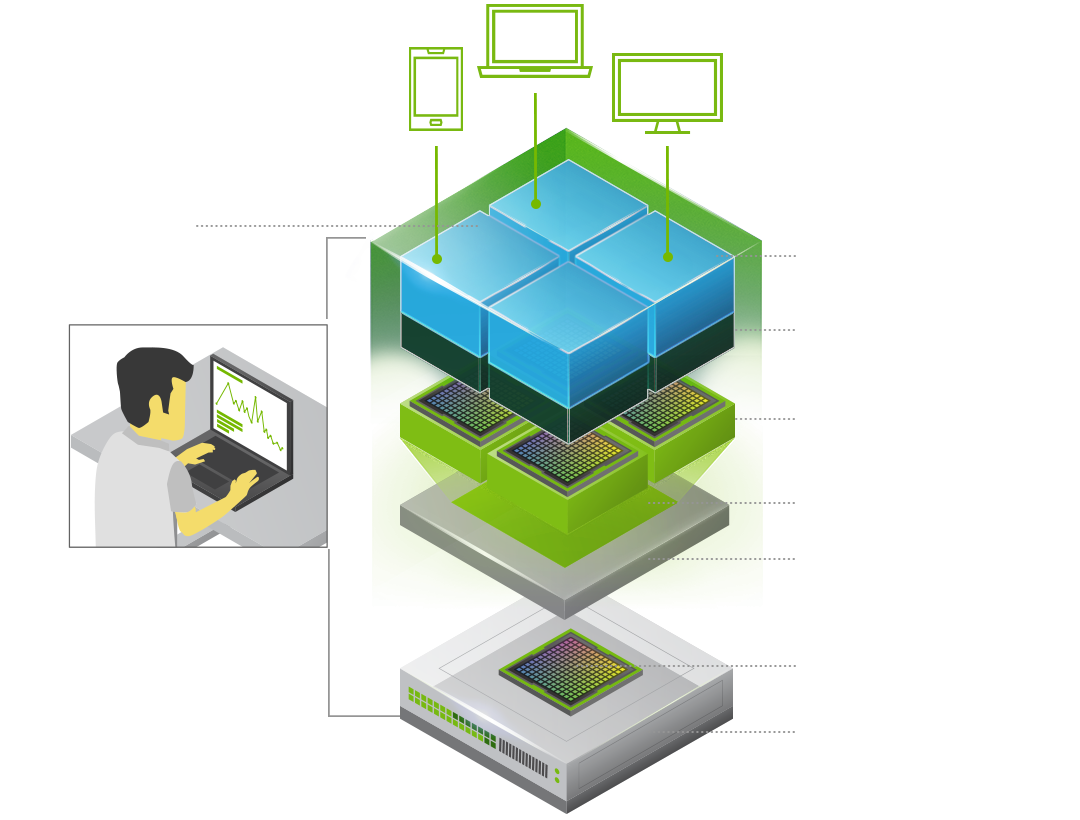
In an NVIDIA vGPU-powered virtualized environment, the vGPU software is installed at the virtualization layer with the hypervisor. The software creates virtual GPUs that enable a single physical GPU to be shared among multiple VMs or a single VM to harness the power of multiple physical GPUs.
vGPU software includes a graphics or enterprise driver for every VM. Since work that was typically done by the CPU is offloaded to the GPU, the user has a much better experience. This enables support for demanding engineering and creative applications, as well as compute-intensive workloads like AI and data science, in a virtualized and cloud environment.
Customer Stories
Explore How Industry Leaders Are Leveraging vGPU
Discover how vGPU technologies are being used to address complex challenges across various industries worldwide.


Adopters
Ecosystem
NVIDIA vGPU seamlessly integrates with a diverse range of ecosystem platforms, including virtual desktop delivery, hypervisors, servers, and public cloud. IT teams can use familiar management tools to effortlessly streamline deployment.


Deployment
Two Ways to Unlock GPU-Accelerated Virtualization
NVIDIA vGPU can be deployed in your on-prem data center or is available in the public cloud for rapid access. Visit the vGPU Documentation Hub to determine which NVIDIA GPU is best suited for your workload.
Next Steps
Ready to Get Started?
Download free NVIDIA vGPU evaluation licenses to access all vGPU software editions and start your PoC today.
How to Buy
Check out the four easy steps that will help you purchase and deploy NVIDIA vGPU software.
Stay Connected
Head to the go-to place for all things vGPU, where you can connect with other users, find answers, and offer your insights.