Forza Horizon 6 GeForce Game Ready Driver Released
Our new GeForce Game Ready Driver optimizes your system for Forza Horizon 6, which features DLSS Super Resolution, DLSS Multi Frame Generation, and ray tracing.
Additionally, there’s support for Directive 8020 and Subnautica 2, which both launch this week with DLSS.
Game Ready For Forza Horizon 6, Featuring DLSS Super Resolution, DLSS Multi Frame Generation & Ray Tracing
Discover the breathtaking landscapes of Japan in over 550 real-world cars and become a racing Legend at the Horizon Festival, in Playground Games and Xbox Game Studios’ Forza Horizon 6. Start your journey as a tourist and explore a world full of hit music and Japanese culture. Build a Valley Estate, acquire awe-inspiring homes, and display your prized car collection in fully Customizable Garages. Cruise the roads with your friends and join Car Meets around Japan, unleash your imagination with EventLab and build together in Horizon CoLab.
In Forza Horizon 6, you will explore a vast campaign of discovery and Festival racing, playable solo and in co-op. Prove you’ve got what it takes to join the Horizon Festival as a rookie driver, all while you Discover Japan and complete your Collection Journal. Qualify for the Festival in the Horizon Invitational, then rise through the ranks in progressively faster cars and earn new Wristbands to become a Horizon Legend. Your newfound status will grant you access to Legend Island, an exclusive space reserved for the greatest drivers.
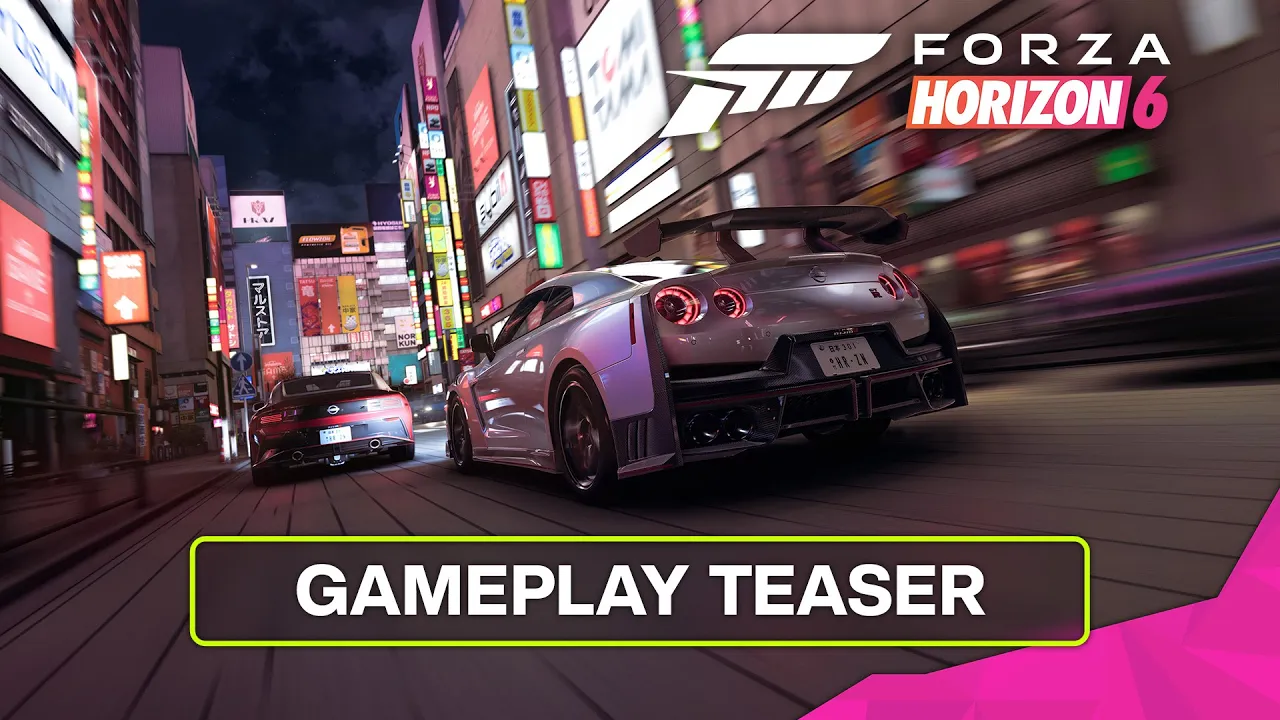
Forza Horizon 6 launches May 15th in Early Access for buyers of the Premium Edition, and May 19th for all other buyers. At launch, all GeForce RTX racers can enhance and accelerate the game’s ray-traced visuals with DLSS 4.5 Super Resolution. And GeForce RTX 50 Series players can multiply frame rates using DLSS Multi Frame Generation.
Via the NVIDIA app, Forza Horizon 6’s DLSS Multi Frame Generation integration can be upgraded to DLSS 4.5 Dynamic Multi Frame Generation 6X Mode, further accelerating frame rates for users seeking the highest possible levels of performance.
DLSS 4.5 Dynamic Multi Frame Generation is an intelligent system that functions like an automatic transmission for your GPU. Instead of sticking to a fixed multiplier, it automatically shifts between different frame multipliers to strike the perfect balance between frame rate, image quality and responsiveness.
In other words, it only generates the frames needed to maximize your target frame rate, or the refresh rate of your display, be that 120Hz, 144Hz, 240Hz, or higher.
By continuously monitoring the gap between your GPU’s performance and your display’s maximum refresh rate, the system adapts in real-time. In graphically intense scenarios, it ‘upshifts’ and increases frame generation to bridge performance dips, ensuring your high-refresh display remains buttery smooth. Conversely, as the workload lightens, it seamlessly shifts the multiplier down to only compute what’s needed.
DLSS 4.5 Dynamic Multi Frame Generation can be activated and configured globally, or on a per game basis in the NVIDIA app’s Graphics tab.
Open “DLSS Override - Frame Generation Mode”, select “Dynamic”, and choose “Max refresh rate” for the NVIDIA app to synchronize your maximum frame rate with the maximum refresh rate of your display, for optimum motion clarity. Alternatively, pick “Custom” and type in a maximum frame rate for DLSS 4.5 Dynamic Multi Frame Generation to target. Additionally, in Forza Horizon 6, users must set the Frame Generation model to “Preset B” in the “DLSS Override - Model Presets” dropdown.
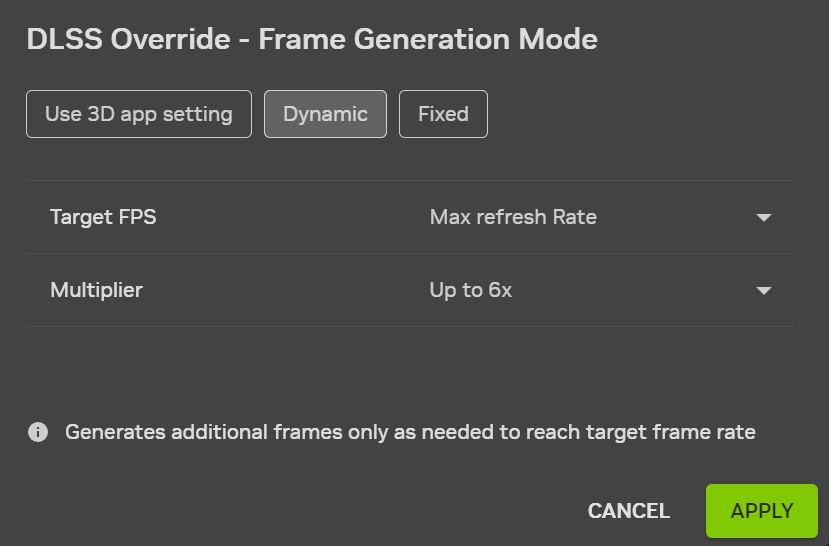
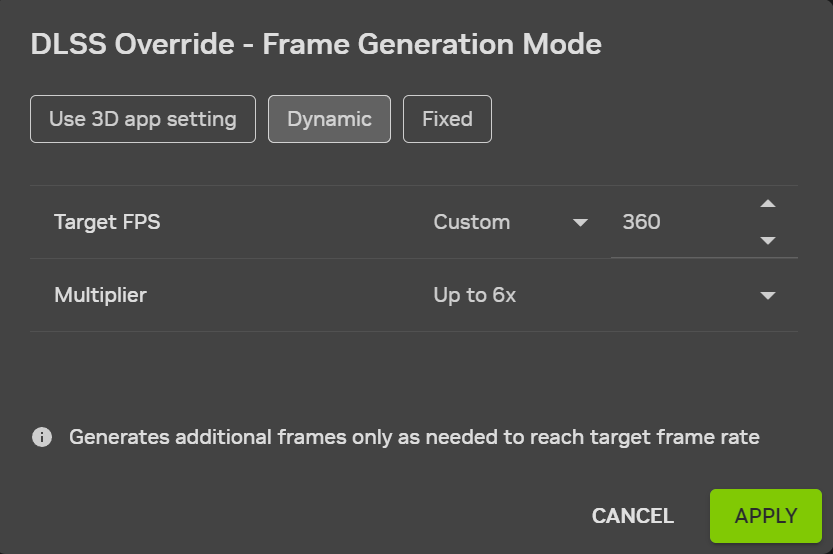
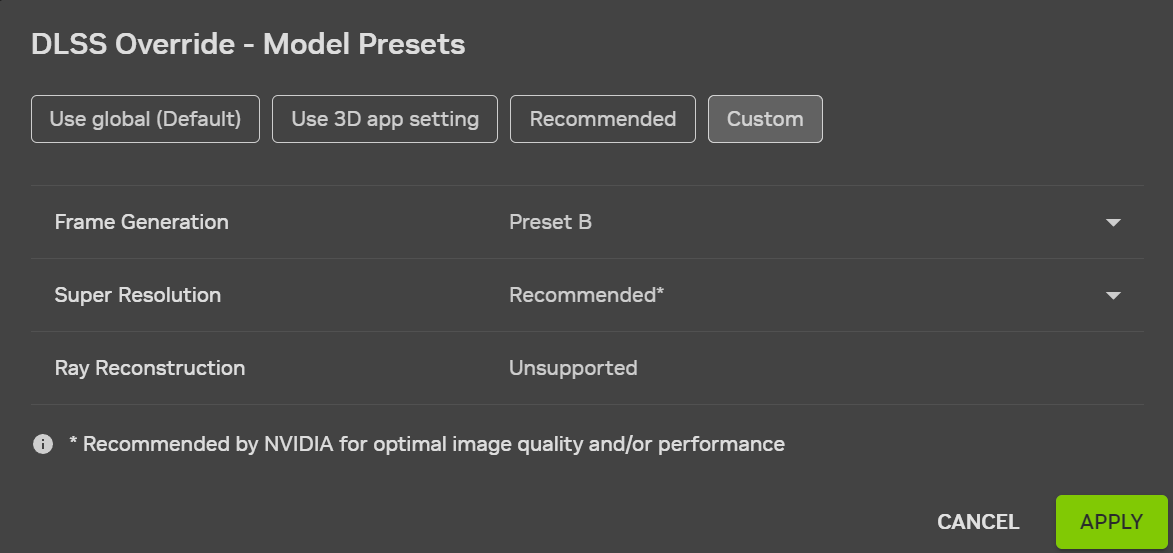
In all titles compatible with DLSS Dynamic Multi Frame Generation, users can activate 4X Multi Frame Generation, and in select titles using more recent Frame Generation .dlls, users can select up to 6X. To see the full list of 6X-compatible titles, please head here
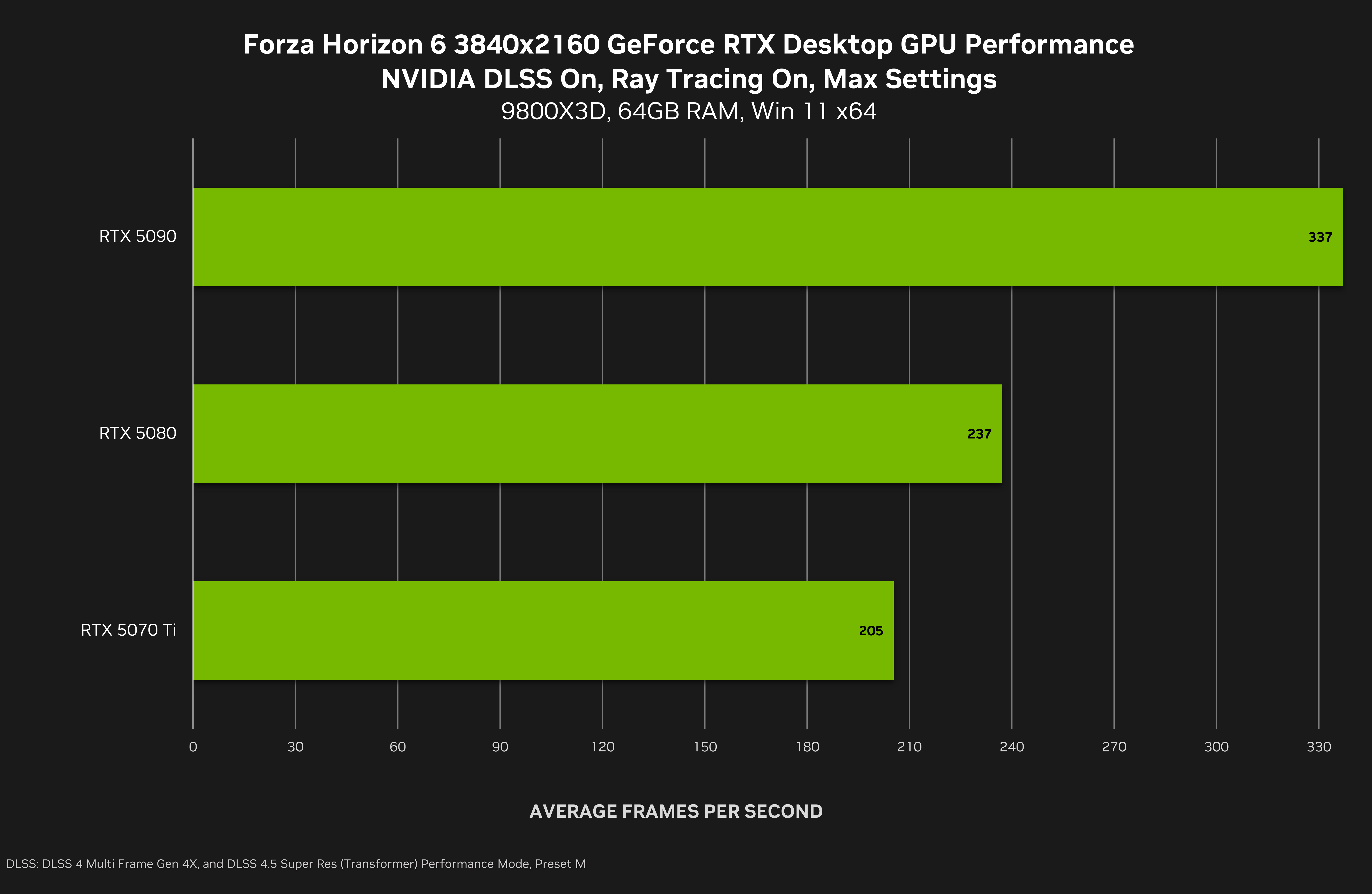
At 4K, GeForce RTX 50 Series desktop GPU owners can experience Forza Horizon 6 at its very best, with max settings and ray tracing, thanks to the 5.2X average performance multiplier delivered by DLSS Super Resolution and DLSS Multi Frame Generation 4X Mode. This massive speed up enables the GeForce RTX 5090 to run Forza Horizon 6 at over 330 frames per second, the GeForce RTX 5080 at over 230 frames per second, and the GeForce RTX 5070 Ti at over 200 frames per second.
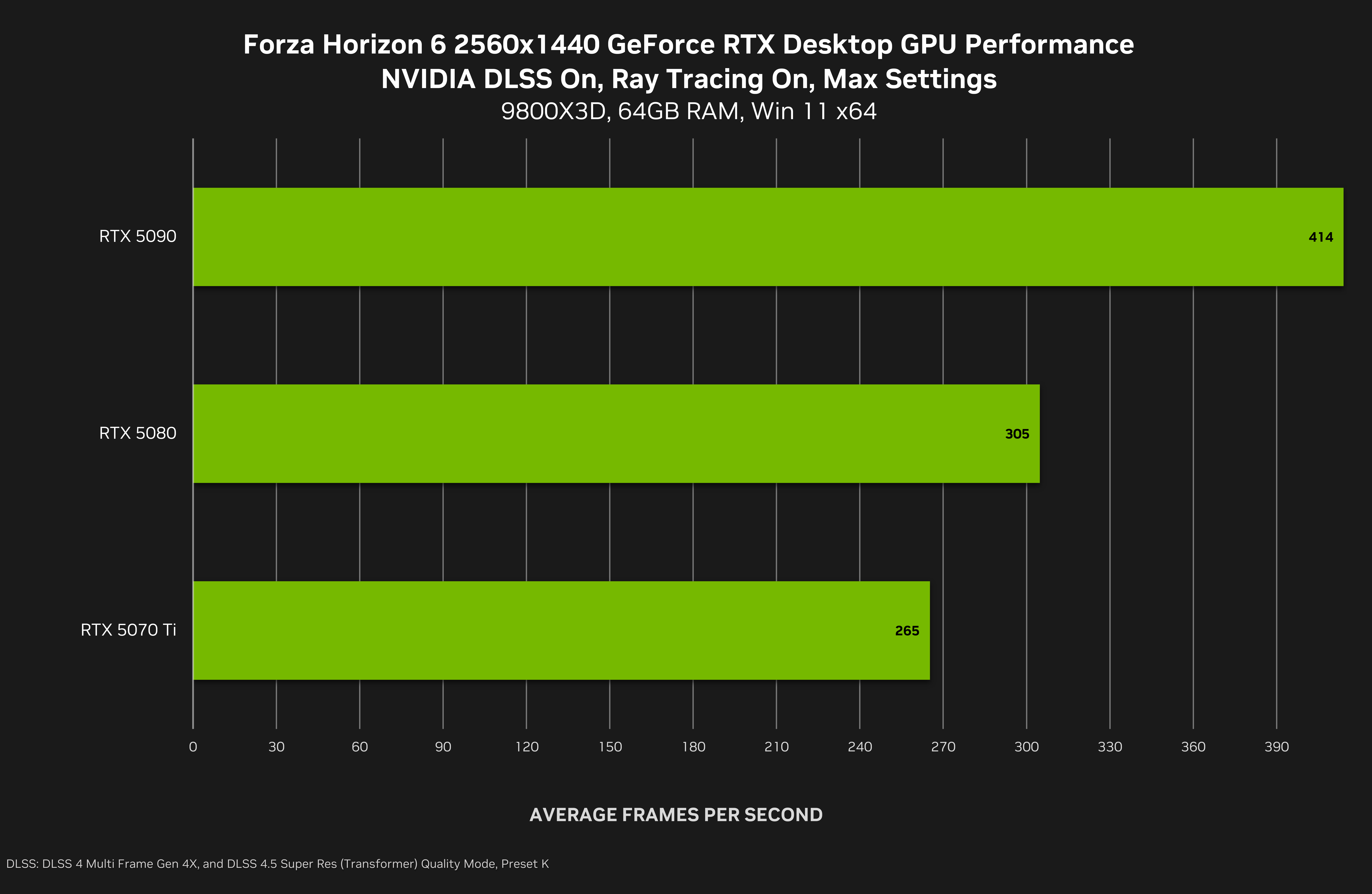
At 2560x1440, GeForce RTX 5090 owners can experience maxed-out, ray-traced Forza Horizon 6 at a blistering 400 frames per second thanks to DLSS Super Resolution and DLSS Multi Frame Generation 4X Mode. An overall 4.1X performance multiplier enables super fast frame rates on other GPUs, too, with the GeForce RTX 5080 surpassing 300 frames per second, and the GeForce RTX 5070 Ti 260 frames per second.
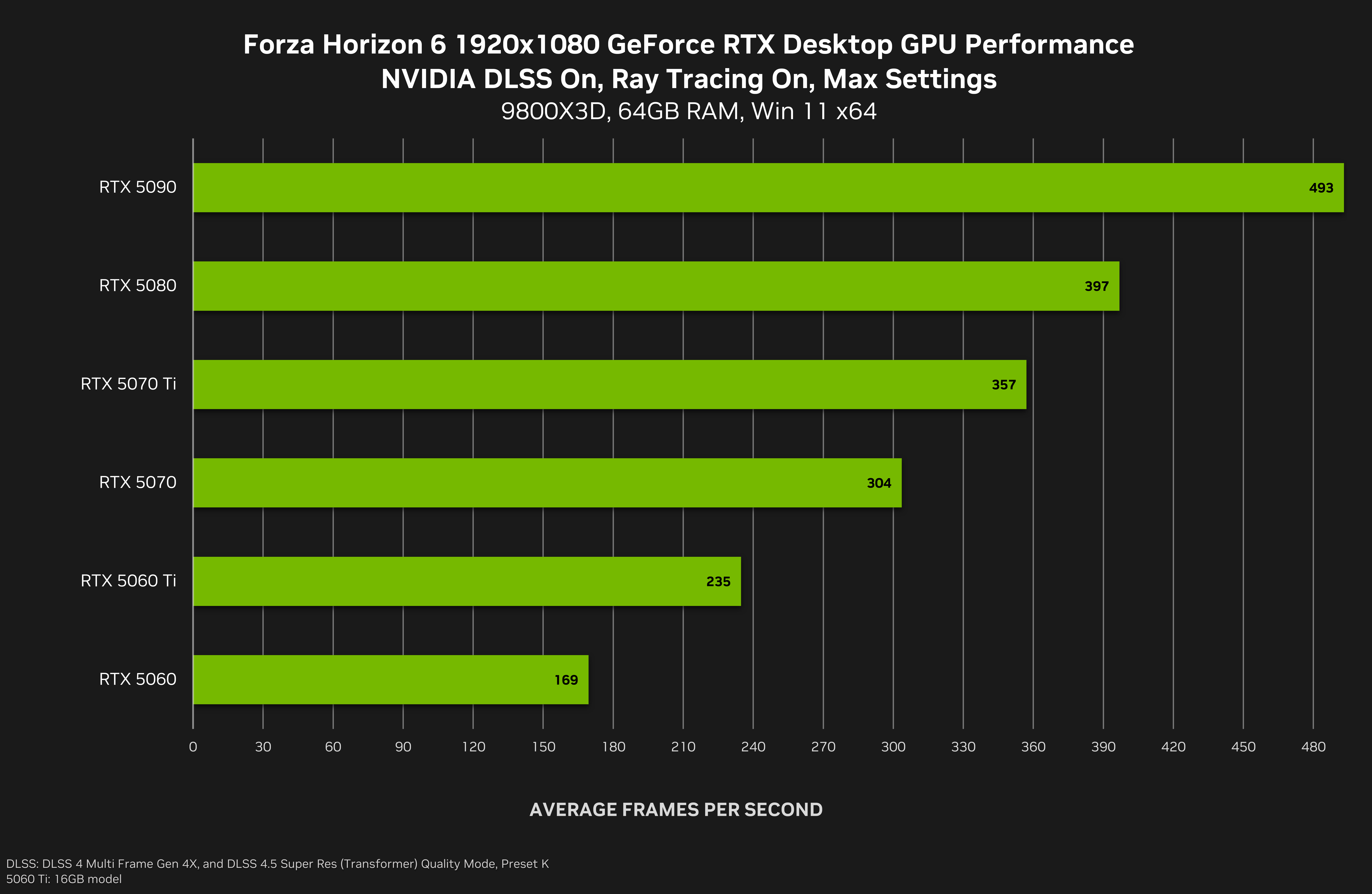
At 1920x1080, DLSS Super Resolution and DLSS Multi Frame Generation 4X Mode work in conjunction to accelerate frame rates by 3.8X on average.
With this multiplier, the GeForce RTX 5090 almost achieves an astonishing 500 frames per second, the GeForce RTX 5080 is almost at 400 frames per second, the GeForce RTX 5070 Ti exceeds 350 frames per second, the GeForce RTX 5070 surpasses 300 frames per second, and the GeForce RTX 5060 Ti runs Forza Horizon 6 at over 230 frames per second. With these maxed out settings, the GeForce RTX 5060 achieves a respectable 169 frames per second - to achieve significantly higher speeds, simply move a few settings from Extreme to Ultra, or High.
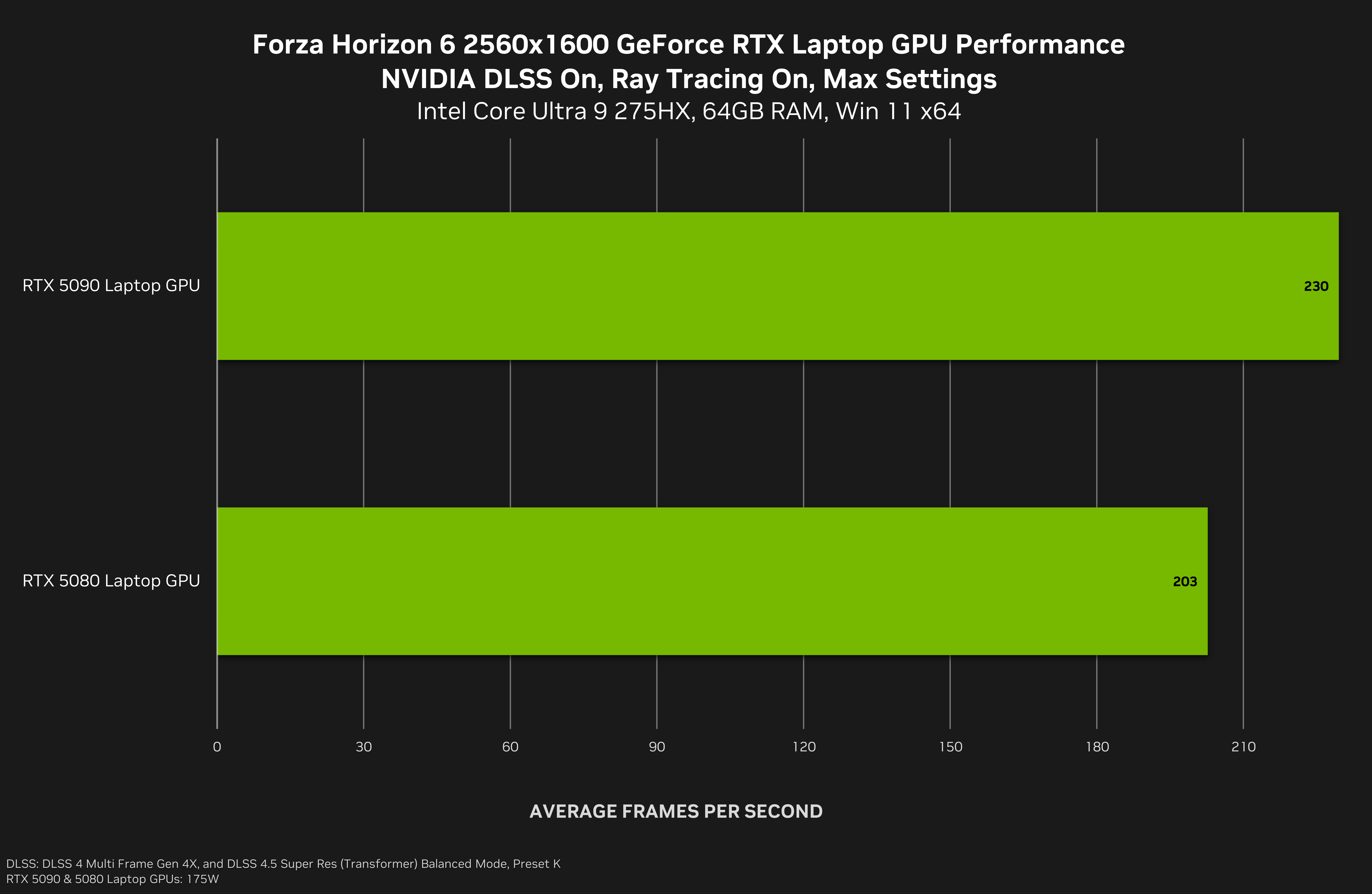
On GeForce RTX 5090 and GeForce RTX 5080 Laptop GPUs, DLSS Super Resolution and DLSS Multi Frame Generation 4X Mode multiply Forza Horizon 6’s 2560x1600 frame rates by an average of 3.9X, enabling owners to play the critically acclaimed game at its very best at up to 230 FPS on portable devices.
At 1920x1080 on GeForce RTX 50 Series Laptops, a 3.9X DLSS performance multiplier sees Forza Horizon 6’s max setting, ray-traced frame rates hit 330 FPS, for super fast on-the-go gaming on GeForce RTX 5090, 5080 and 5070 Ti Laptop GPUs.
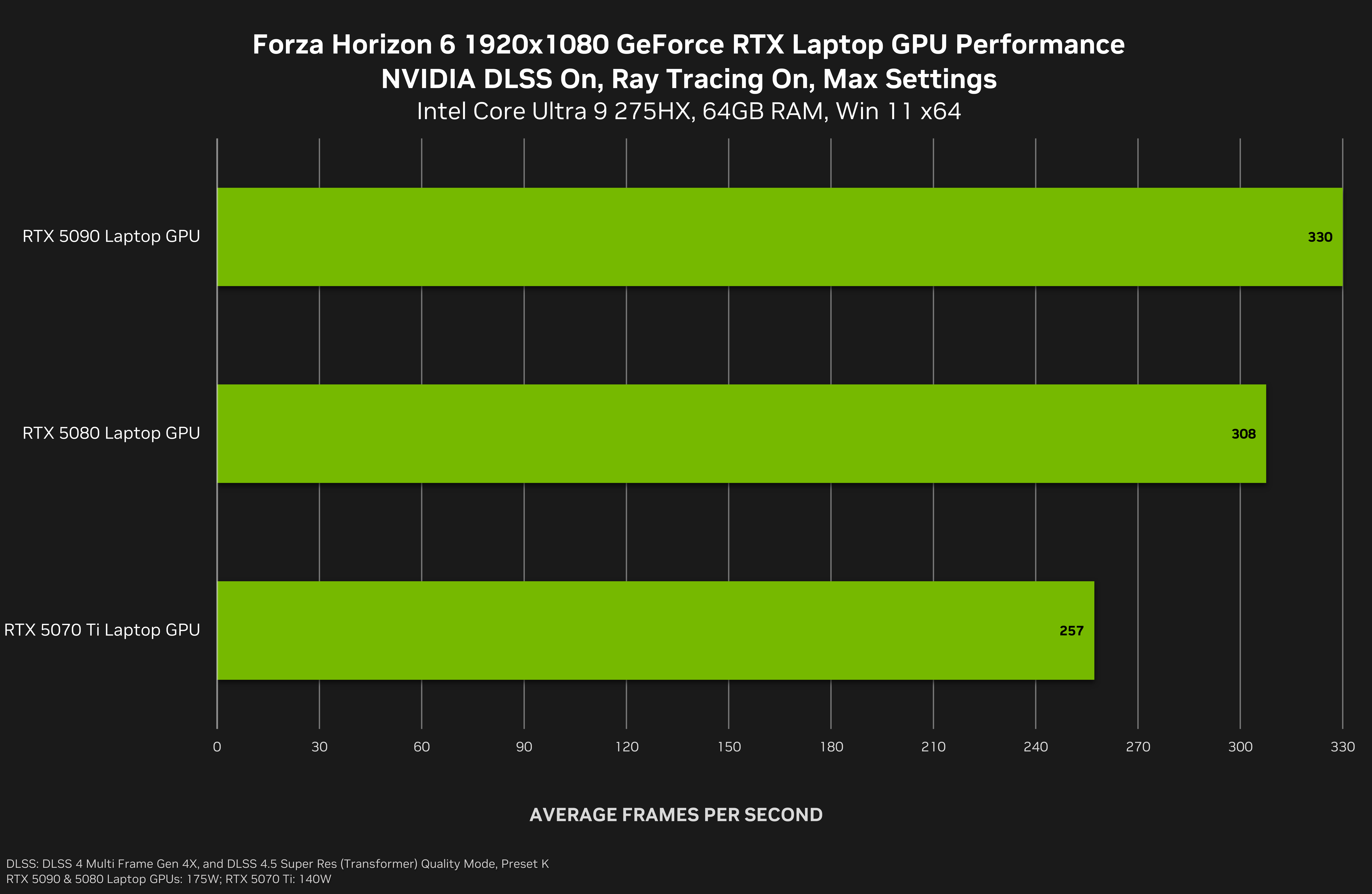
For an optimum experience in Forza Horizon 6, with the high frame rates shown above, be sure to download today’s new GeForce Game Ready Driver.
Game Ready For Directive 8020, Featuring DLSS 4.5 & Path Tracing
In Directive 8020, Earth is dying and humanity is running out of time. 12 light years from home, Tau Ceti f offers a small sliver of hope. When the colony ship Cassiopeia crash lands on the planet, its crew soon realize they are far from being alone. From Supermassive Games, creators of Until Dawn and The Quarry, this all-new cinematic sci-fi horror adventure, set in their Dark Pictures universe, blends intense survival gameplay with meaningful choices and a branching storyline.
Hunted by an alien organism capable of mimicking its prey, the crew of the Cassiopeia must outwit their pursuers to make it home alive. ‘Fight to survive in single-player story mode or recruit up to five players to join you on your mission in couch-co-op movie night mode. Choose which crew members to control and work together with your friends to survive alien infiltrators, deadly dilemmas, and catastrophic system failures.
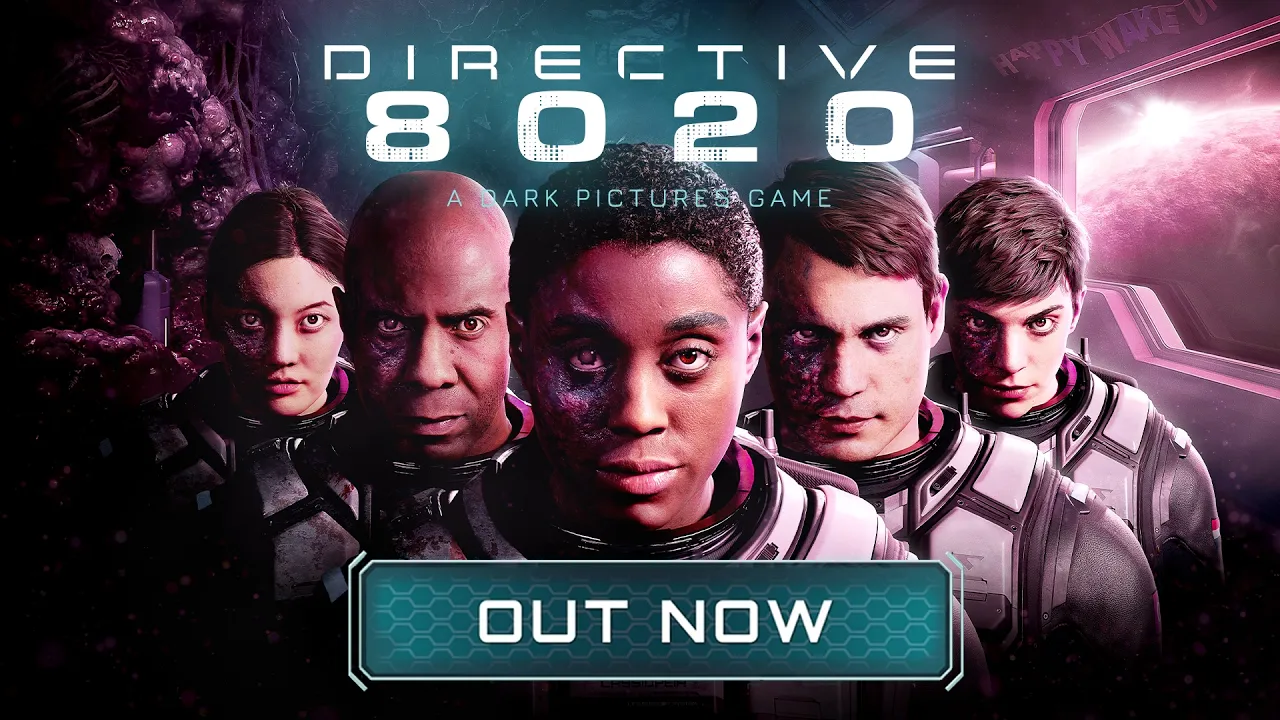
When Supermassive Games’ Directive 8020 launches later today, it can be experienced in remarkable detail on GeForce RTX 50 Series systems. Path-traced lighting and effects, enhanced by DLSS Ray Reconstruction will elevate image quality to new heights. And DLSS 4.5 Dynamic Multi Frame Generation will maximize performance.
Game Ready For Subnautica 2, Featuring DLSS Super Resolution & DLSS Frame Generation
Unknown Worlds’ Subnautica 2 is an underwater survival adventure game set on an all-new alien world. Driven from your home by ongoing conflict, Alterra offers you the chance at a new life. But as the colony ship CICADA shepherds you and your fellow Pioneers to your new home, something goes awry. The ship’s AI insists that your mission should continue. Stranded and faced with near-insurmountable odds, you must do everything in your power to survive. The future of humanity on this world is in your hands.
To survive the depths and make this planet your home, you’ll need to utilize all the tools at your disposal, alone, or with the help of up to three friends in online co-op. Traverse vibrant and breathtaking biomes with your Tadpole submersible. Design and customize bases to return to when your adventures push you beyond the safety of shallow waters.
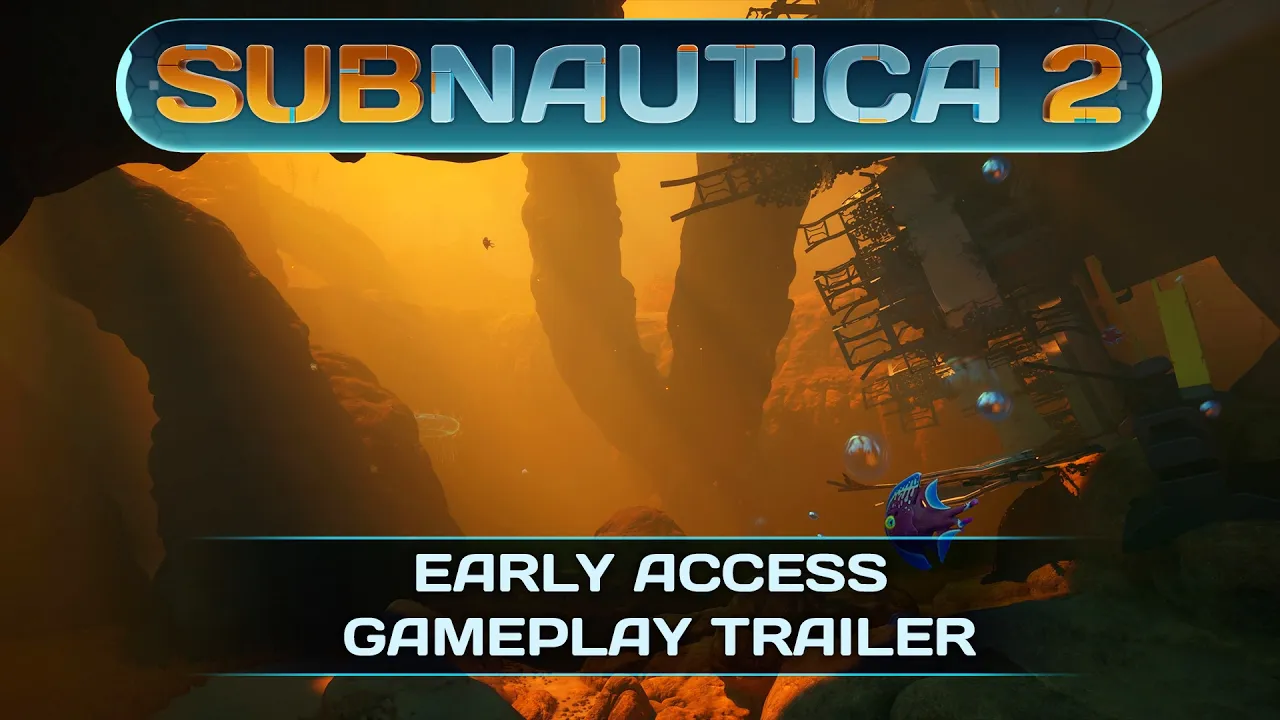
Subnautica 2 enters Early Access on May 14th, and at launch there’ll be support for DLSS Super Resolution and DLSS Frame Generation, which in the NVIDIA app can be upgraded to DLSS 4.5 Super Resolution and DLSS 4.5 Multi Frame Generation 6X Mode, for even better image quality, and higher levels of performance.
GeForce Game Ready Driver - Download Now
Learn more about GeForce Game Ready Drivers here, and download the new GeForce Game Ready 596.49 WHQL driver through the NVIDIA app, or from GeForce.com.
If you experience any technical issues with the new Game Ready drivers please post a detailed report on the GeForce.com Driver Feedback Forum, where our Customer Care team can best assist you. And if you’re looking for a full list of fixes in this driver, for previously-reported issues, head here.