NVIDIA App Update Adds DLSS 4.5 Super Resolution & New GeForce Game Ready Driver
By Andrew Burnes on January 05, 2026
|
NVIDIA DLSS 4.5 Super Resolution further enhances image quality in over 400 games and apps. To enhance your favorite titles, download and install our new GeForce Game Ready Driver and our new NVIDIA app update.
Read on to learn more.
Game Ready For NVIDIA DLSS 4.5 Super Resolution
Since its debut at CES 2025, DLSS 4 has set the standard for AI rendering with transformer-based Super Resolution and 4X Multi Frame Generation. Over 250 games and apps are already supported, making DLSS 4 NVIDIA’s most rapidly adopted gaming technology.
At CES 2026, we're raising the bar yet again with NVIDIA DLSS 4.5.
DLSS 4.5 Super Resolution, available today, introduces a 2nd generation transformer model for DLSS Super Resolution that delivers state-of-the-art image quality. And 6X Dynamic Multi Frame Generation, available Spring, automatically adjusts the frame rate multiplier for smooth 240+ FPS, 4K path-traced gaming.
Watch NVIDIA’s Bryan Catanzaro walk through NVIDIA DLSS 4.5
For more details about each of the new DLSS 4.5 features head to our dedicated announcement article.
How To Enhance Over 400 Games & Apps With NVIDIA DLSS 4.5 Super Resolution
To further enhance the fidelity of your game library, you can apply DLSS 4.5 Super Resolution on a per-game or global basis.
On the Graphics tab of the NVIDIA app, either click a detected game in the list, or click “Global Settings” on the top of the screen. Scroll to the three “DLSS Override” settings, and open the “Model Presets” option.

Select “Recommended”, which applies Preset M to DLSS Performance mode, Preset L to DLSS Ultra Performance mode, and Preset K to the remaining modes.
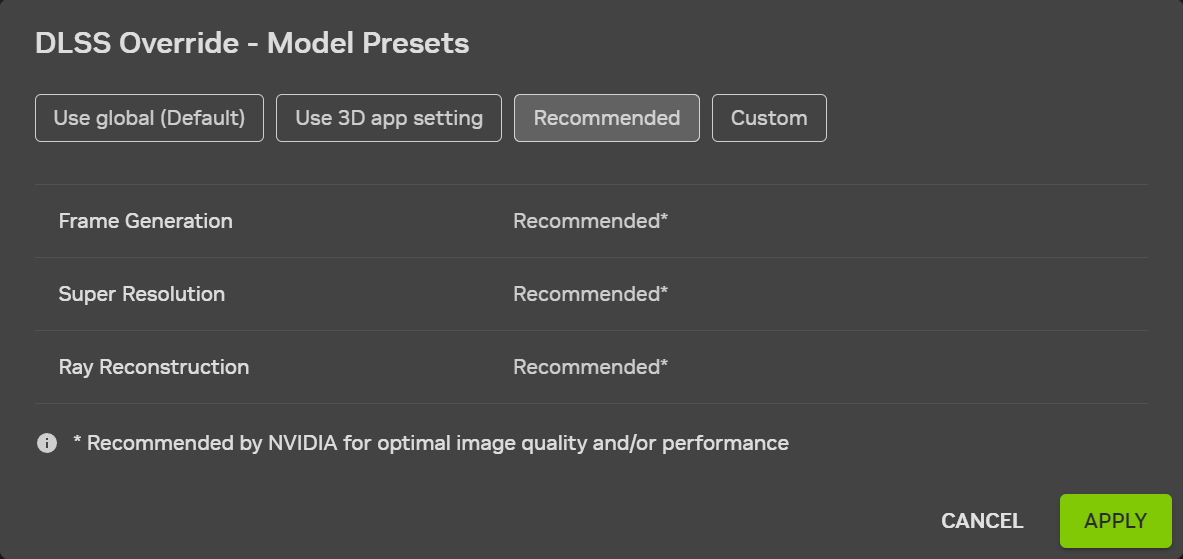
This new “Recommended” setting replaces “Latest” to better align with the two new DLSS 4.5 Super Resolution models: Model M is optimized for DLSS Super Resolution Performance mode, and Model L is optimized for 4K DLSS Super Resolution Ultra Performance mode. While both models are supported for both DLSS Super Resolution Quality and Balanced modes, and DLAA, users will see the best quality vs. performance benefits in Performance and Ultra Performance modes.
Please note that GeForce RTX 20 and 30 Series GPUs lack native FP8 support, so Models M and L carry a heavier performance impact for these GPUs. Those users may therefore prefer to remain on Model K (DLSS 4.0), for an optimal balance of performance and image quality. With the NVIDIA app's DLSS Overrides, you control the Model, and the balance between image quality and performance for your PC.
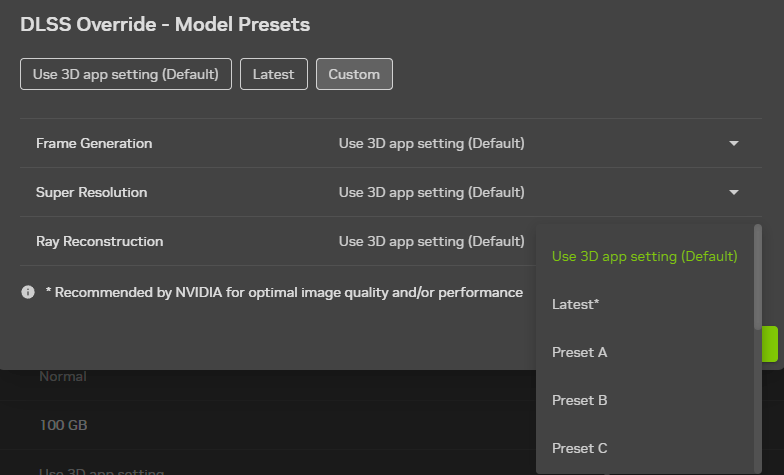
If you want to control each option individually, applying specific models, click “Custom”, then open the dropdowns for each DLSS technology.
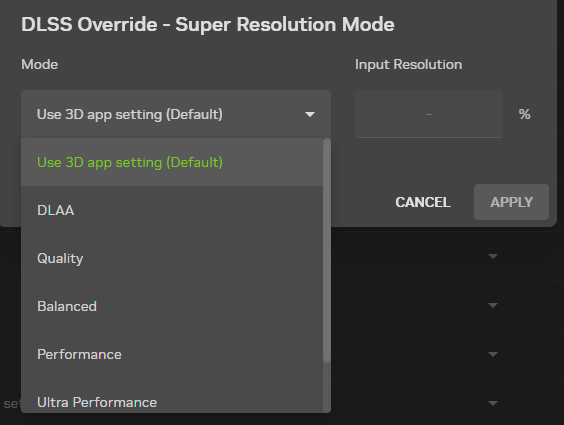
To further customize your DLSS experience, you can adjust the quality of DLSS scaling on a global or per-game basis, and activate DLAA in titles that lack an in-game option for the quality-maximizing setting. Simply open the “Super Resolution Mode” DLSS override, pick a preset or DLAA, or define your own quality level using “Custom”, then hit “Apply”. This allows you to fine-tune image quality and performance.
And finally, if you’re a GeForce RTX 50 Series owner, you can activate DLSS Multi Frame Generation in DLSS Frame Generation games with the “Frame Generation Mode” DLSS override, increasing performance.

New NVIDIA App Features
In addition to the new DLSS 4.5 Super Resolution overrides, NVIDIA app 11.0.6 includes a few new features.
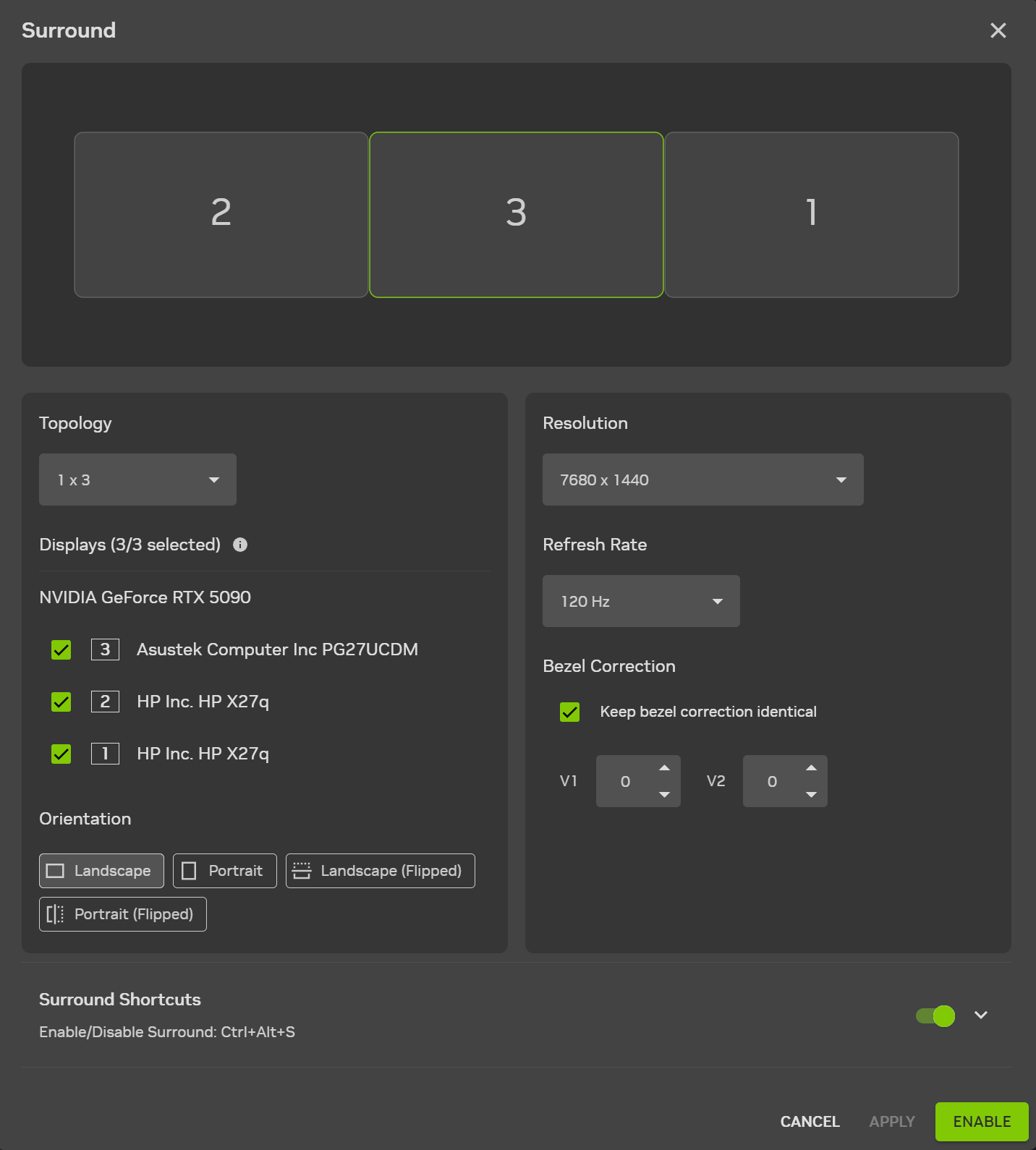
In System > Displays, all remaining NVIDIA Surround settings have been brought over from the NVIDIA Control Panel, adding options for bezel correction and hotkeys.
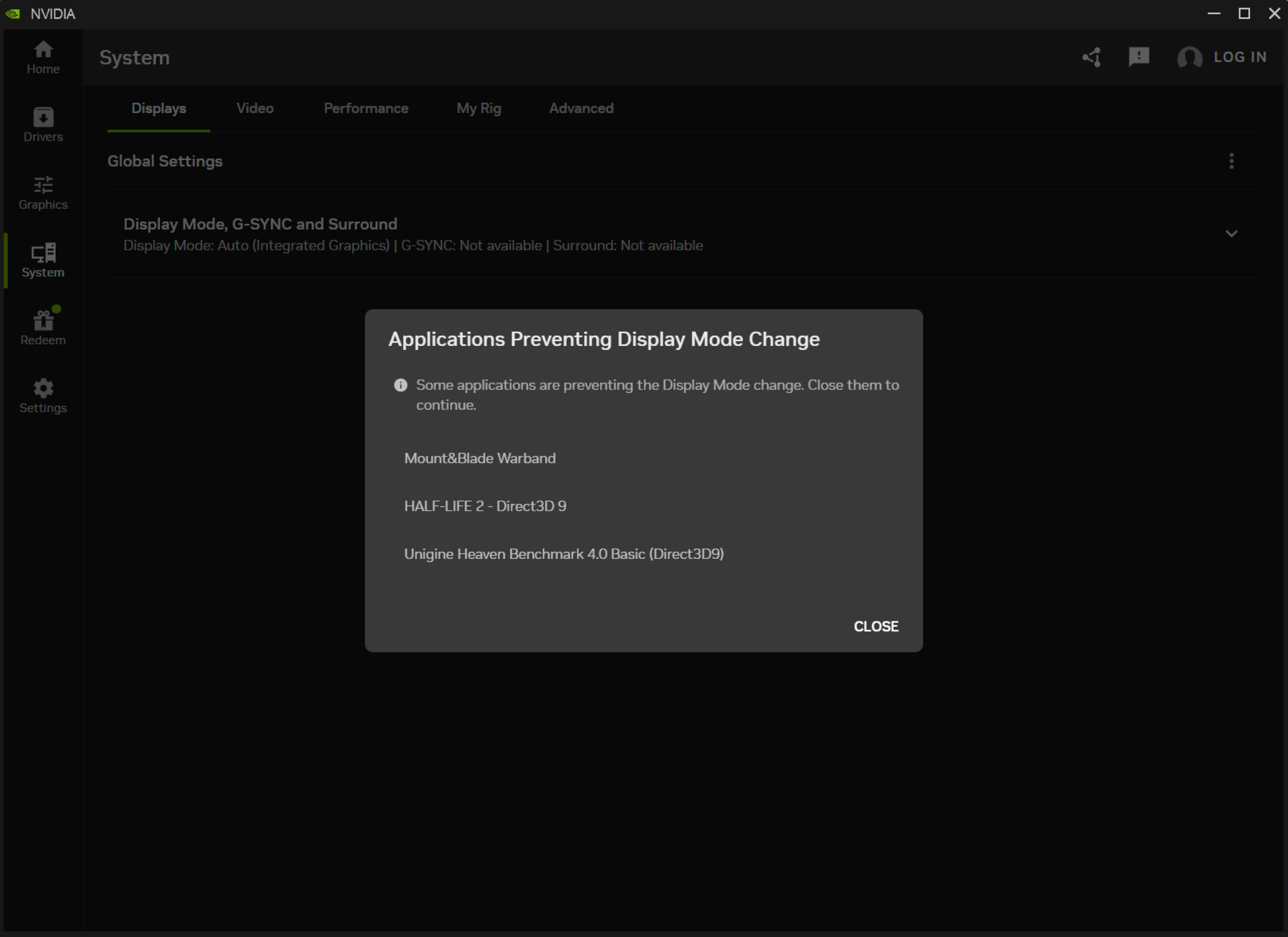
Laptop users with Advanced Optimus can now see the full names of applications blocking the feature’s activation, rather than just the .exe names, helping identify problematic programs.
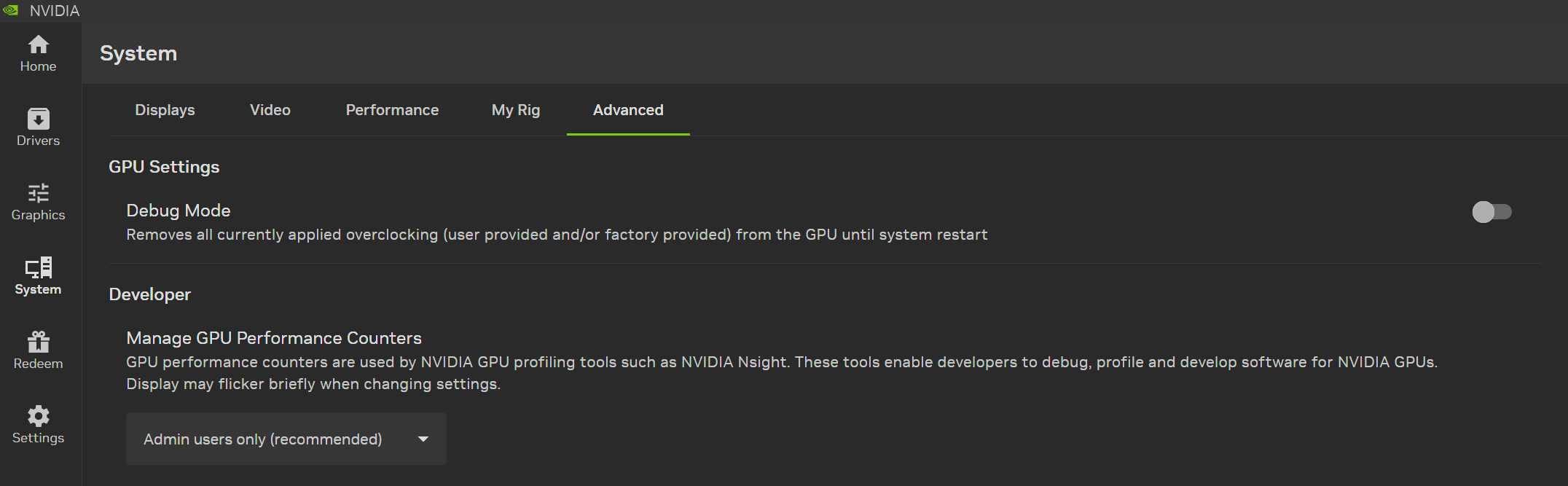
In System > Advanced, “Debug Mode” instantly disables all overclocking and voltage tweaks applied via any application, helping you and customer care teams determine whether these are responsible for system instability, until the system restarts.
And there’s an advanced “Developer” option related to the use of profiling and debugging tools that gamers and general users can leave as-is.
NVIDIA Broadcast 2.1 Brings Virtual Key Light to More PC Users
NVIDIA Broadcast improves the quality of a user’s microphone and webcam with AI effects, ideal for livestreaming and video conferencing.
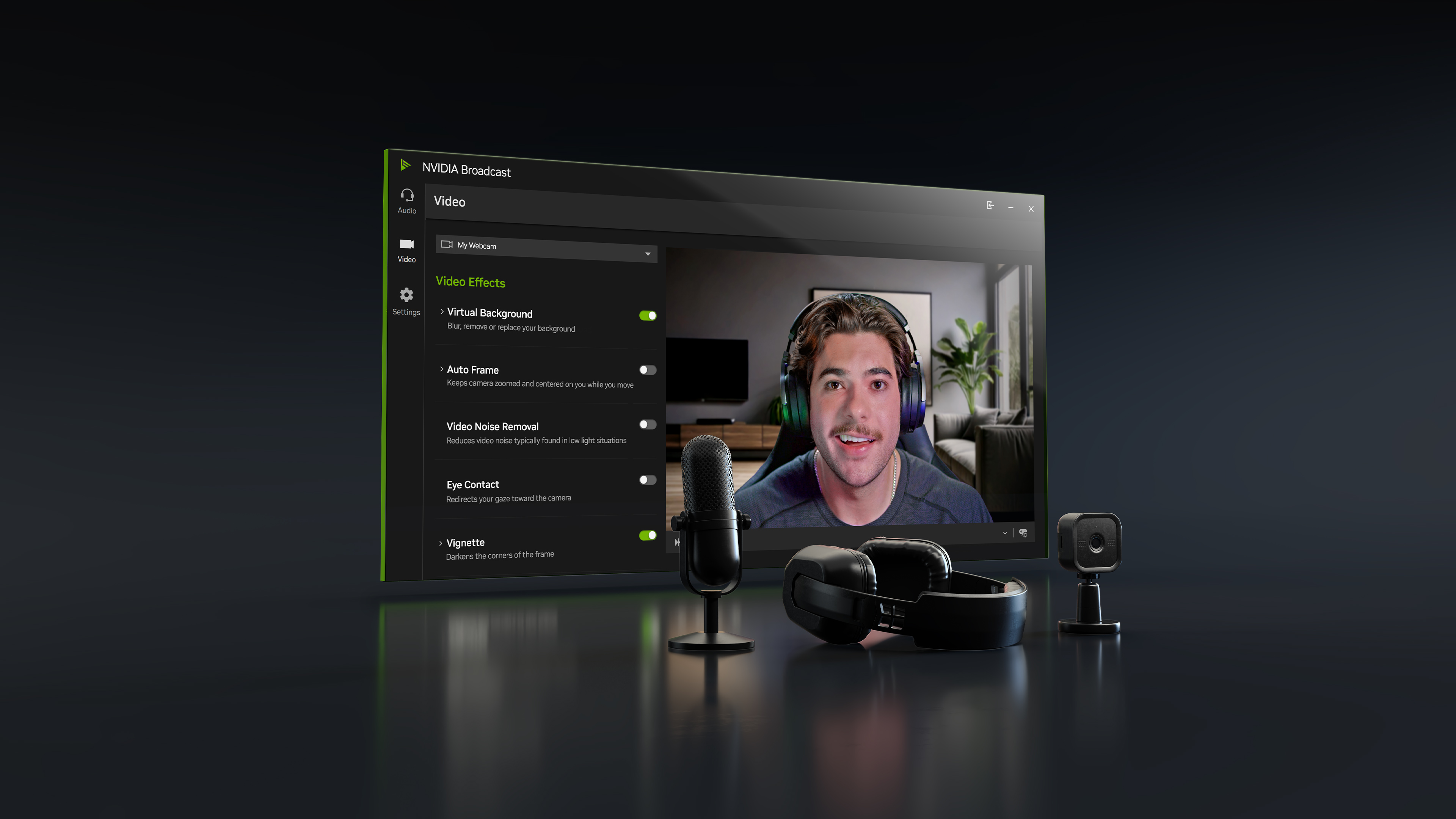
Our new version 2.1 update enhances the Virtual Key Light effect to improve performance, making it available for GeForce RTX 3060 GPUs and higher. Plus, it now handles more lighting conditions, offers broader color temperature control, and uses an updated HDRi base map for a two‑key‑light style often seen in professional streams.
Download the NVIDIA Broadcast update today.
Support For NVIDIA G-SYNC Monitors With Pulsar & Ambient Adaptive Technology
In 2013, the launch of G-SYNC revolutionized displays and gaming, introducing Variable Refresh Rate (VRR) technology that all major display manufacturers now incorporate. In the years since, we’ve further enhanced G-SYNC and its capabilities, and brought its technology to TVs and the cloud, enabling GeForce RTX gamers to have the definitive experience throughout their homes.
Today, the next generation of G-SYNC begins with the launch of G-SYNC Pulsar, the latest evolution of our pioneering VRR technology. G-SYNC Pulsar delivers a stutter-free experience with buttery smooth motion, and a new gold standard for visual clarity and fidelity through the invention of variable frequency backlight strobing.
G-SYNC Pulsar displays from Acer, AOC, ASUS and MSI will be available starting January 7th, 6AM PT.
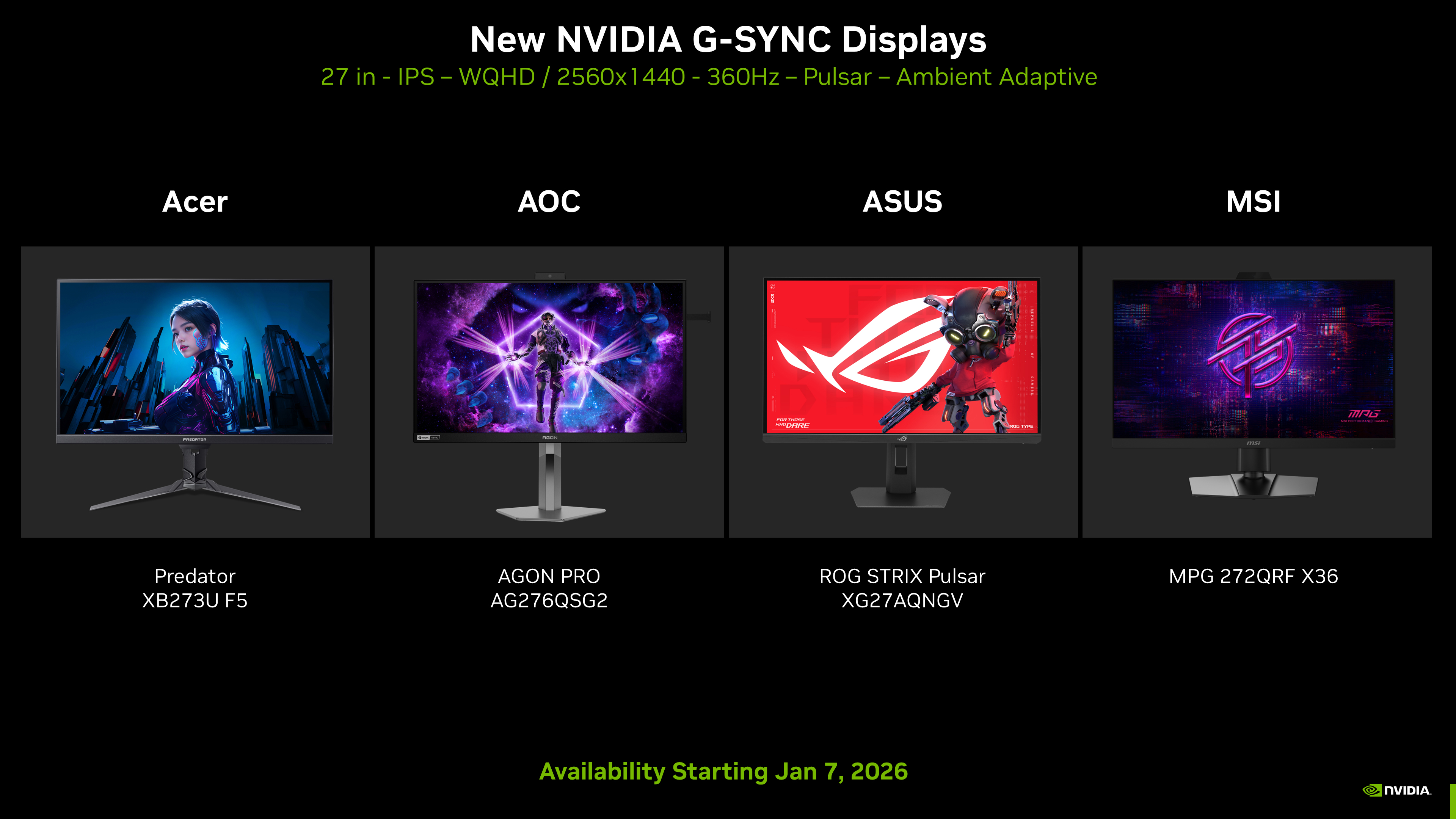
Each of the debut G-SYNC Pulsar displays includes our new G-SYNC Ambient Adaptive Technology, enabling color temperature and brightness to be automatically tuned for optimal viewing at any hour of the day or night.
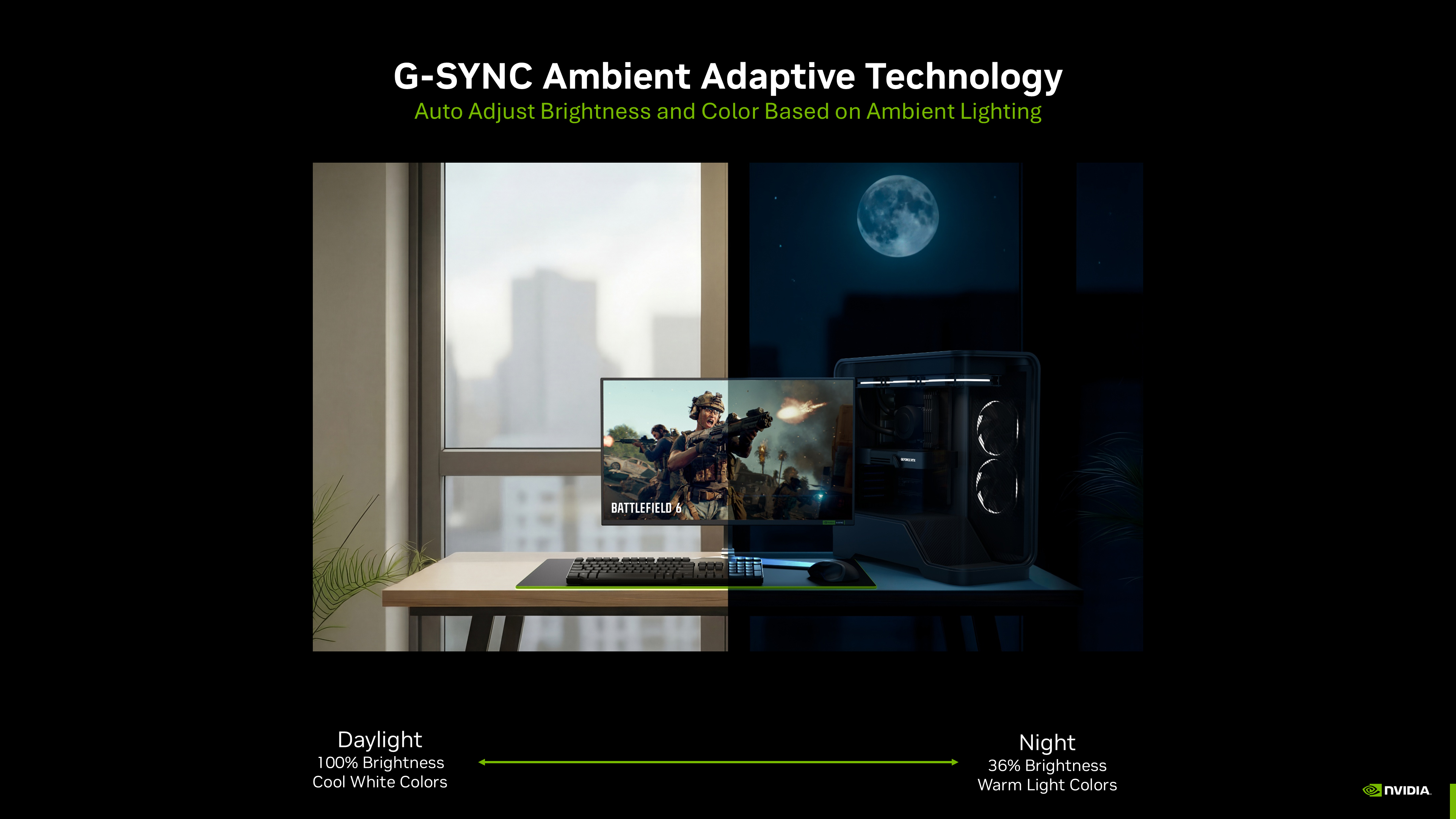
Our new G-SYNC Pulsar displays are also the first to be built in collaboration with MediaTek, enabling G-SYNC technologies to be incorporated directly into the display scaler, bypassing the need for dedicated G-SYNC modules. This streamlines production, making G-SYNC more accessible for monitor manufacturers, helping us bring G-SYNC technologies and displays to more consumers faster than ever before.
For more info about G-SYNC Pulsar and Ambient Adaptive Technology check out the video above and our dedicated G-SYNC article
Support For Newly Validated G-SYNC Compatible Displays
Our new Game Ready Driver also adds support for 63 G-SYNC Compatible displays, including new 2026 TV models from LG and Samsung, that deliver a baseline Variable Refresh Rate (VRR) experience that’s been validated by our G-SYNC team, making gaming smoother and more enjoyable. G-SYNC Compatible VRR is available on hundreds of monitors and TVs from leading manufacturers, in all sizes and at all price points, giving GeForce users a ton of choice when searching for a display.
On the list, there’s support for the new 27-inch G-SYNC Compatible Samsung Odyssey G60H monitor, the world’s first 1,040Hz dual mode competitive gaming display.
And support for the ASUS ROG Strix 5K XG27JCG, a 27-inch, 180Hz, Fast IPS 5120x2880 (5K) display, with 218 pixels per inch, the highest of any G-SYNC Compatible display, for users seeking super sharp images and detail. And for gamers wanting faster response times and refresh rates in competitive titles, the XG27JCG can switch to a 2560x1440 330Hz mode.
For the complete list of new monitors, displays and TVs check out the list below, and to see a rundown of all G-SYNC displays, head to the G-SYNC homepage.
| Brand | Model | HDR | Size | Type | Resolution | VRR |
| Acer | X27U W1 | Yes | 27 | OLED | 2560x1440 (QHD) | 48-240Hz |
Acer |
X27U W2 |
Yes |
26.5 |
OLED |
2560x1440 (QHD) |
48-240Hz |
Acer |
X32 X5 |
Yes |
31.5 |
OLED |
3840x2160 (4K) |
48-240Hz |
Acer |
XB323QK V4 |
Yes |
31.5 |
IPS |
3840x2160 (4K) |
48-160Hz |
AOC |
24G4ZR |
Yes |
23.8 |
IPS |
1920x1080 (FHD) |
48-260Hz |
AOC |
24G4ZRE |
Yes |
23.8 |
IPS |
1920x1080 (FHD) |
48-260Hz |
AOC |
24G51F |
Yes |
24 |
IPS |
1920x1080 (FHD) |
48-144Hz |
AOC |
27G4ZR |
Yes |
27 |
IPS |
1920x1080 (FHD) |
48-260Hz |
AOC |
27G51F |
Yes |
27 |
IPS |
1920x1080 (FHD) |
48-144Hz |
AOC |
27G51Z |
Yes |
27 |
IPS |
1920x1080 (FHD) |
48-260Hz |
AOC |
AG256FS |
Yes |
24.5 |
IPS |
1920x1080 (FHD) |
48-390Hz |
AOC |
AG275QS |
Yes |
27 |
IPS |
2560x1440 (QHD) |
60-320Hz |
AOC |
AG275QS2 |
Yes |
27 |
IPS |
2560x1440 (QHD) |
60-320Hz |
AOC |
AG275QSR |
Yes |
27 |
IPS |
2560x1440 (QHD) |
60-320Hz |
AOC |
AG275QSW |
Yes |
27 |
IPS |
2560x1440 (QHD) |
60-320Hz |
AOC |
AG275UXM2 |
Yes |
27 |
MiniLED |
3840x2160 (4K) |
48-160Hz |
AOC |
AGP277QKD |
Yes |
27 |
OLED |
2560x1440 (QHD) |
48-540Hz |
AOC |
Q27G41ZDP |
Yes |
27 |
OLED |
2560x1440 (QHD) |
48-240Hz |
AOC |
Q27G4K |
Yes |
27 |
IPS |
2560x1440 (QHD) |
48-420Hz |
AOC |
Q27G4SP |
Yes |
27 |
IPS |
2560x1440 (QHD) |
48-320Hz |
AOC |
Q27G4Z |
Yes |
27 |
IPS |
2560x1440 (QHD) |
48-260Hz |
AOC |
Q27G4ZDP/WS |
Yes |
27 |
OLED |
2560x1440 (QHD) |
48-280Hz |
AOC |
Q24G50F |
Yes |
23.8 |
IPS |
2560x1440 (QHD) |
48-144Hz |
AOC |
U27G4F |
Yes |
27 |
IPS |
3840x2160 (4K) |
48-190Hz |
AOC |
U32G4U |
Yes |
31.5 |
IPS |
3840x2160 (4K) |
48-160Hz |
ASUS |
PG27AQWP-W |
Yes |
26.5 |
OLED |
1280x720 |
48-720Hz |
ASUS |
PG32UCDM3 |
Yes |
31.5 |
OLED |
3840x2160 (4K) |
48-240Hz |
ASUS |
PG34WCDN |
Yes |
34 |
IPS |
3440x1440 (WQHD) |
48-360Hz |
ASUS |
VG27AQE5A |
Yes |
27 |
IPS |
2560x1440 (QHD) |
48-165Hz |
ASUS |
VG27UQEL5A |
Yes |
27 |
IPS |
1920x1080 (FHD) |
48-310Hz |
ASUS |
XG27JCG |
Yes |
27 |
IPS |
2560x1440 (QHD) |
48-330Hz |
ASUS |
XG27UCSR |
Yes |
27 |
IPS |
3840x2160 (4K) |
48-160Hz |
ASUS |
XG27UCSR |
Yes |
27 |
IPS |
1920x1080 (FHD) |
48-324Hz |
GIGABYTE |
MO27Q28GR |
Yes |
27 |
OLED |
2560x1440 (QHD) |
48-280Hz |
HKC |
ANT257PF |
Yes |
25 |
IPS |
1920x1080 (FHD) |
48-750Hz |
I-O DATA |
GDQ271RA |
Yes |
27 |
IPS |
2560x1440 (QHD) |
59-320Hz |
iiyama |
PL2591H |
Yes |
25 |
IPS |
1920x1080 (FHD) |
48-320Hz |
iiyama |
PL2771UH |
Yes |
27 |
IPS |
3840x2160 (4K) |
48-144Hz |
LG |
32G620B |
Yes |
31.5 |
IPS |
2560x1440 (QHD) |
48-200Hz |
LG TV |
B6 2026 |
Yes |
48, 55, 65, 77, 83 |
OLED |
3840x2160 (4K) |
40-144Hz |
LG TV |
B6E 2026 |
Yes |
48, 55, 65, 77, 83 |
OLED |
3840x2160 (4K) |
40-120Hz |
LG TV |
C6 2026 |
Yes |
42, 48, 55, 65, 77, 83 |
OLED |
3840x2160 (4K) |
40-165Hz |
LG TV |
CS6 2026 |
Yes |
55, 65 |
OLED |
3840x2160 (4K) |
40-144Hz |
LG TV |
G6 2026 |
Yes |
48, 55, 65, 77, 83 |
OLED |
3840x2160 (4K) |
40-165Hz |
LG TV |
G6 2026 |
Yes |
97 |
OLED |
3840x2160 (4K) |
40-120Hz |
LG TV |
W6 2026 |
Yes |
77, 83 |
OLED |
3840x2160 (4K) |
40-165Hz |
Philips |
27M2G5800 |
Yes |
27 |
IPS |
5120x2880 (5K) |
48-165Hz |
Philips |
27M2N5500X |
Yes |
27 |
IPS |
2560x1440 (QHD) |
48-425Hz |
Philips |
27M2N5501P |
Yes |
27 |
IPS |
2560x1440 (QHD) |
48-260Hz |
Philips |
27M2N8800 |
Yes |
27 |
OLED |
3840x2160 (4K) |
48-240Hz |
Samsung |
G61SH |
Yes |
27 |
OLED |
2560x1440 (QHD) |
48-240Hz |
Samsung |
Odyssey G6 (G60H) |
Yes |
27 |
IPS |
2560x1440 (QHD) |
48-600Hz |
Samsung TV |
S85H Smart OLED TV 2026 |
Yes |
48, 55, 65, 77, 83 |
OLED |
3840x2160 (4K) |
48-120Hz |
Samsung TV |
S90H Smart OLED TV 2026 |
Yes |
42, 48, 55, 65, 77, 83 |
OLED |
3840x2160 (4K) |
48-165Hz |
Samsung TV |
S95H Smart OLED TV 2026 |
Yes |
48, 55, 65, 77, 83 |
OLED |
3840x2160 (4K) |
48-165Hz |
ViewSonic |
VX24G30 |
Yes |
24 |
IPS |
1920x1080 (FHD) |
48-240Hz |
ViewSonic |
VX24G30-BL |
Yes |
24 |
IPS |
1920x1080 (FHD) |
48-240Hz |
ViewSonic |
VX24G30-PK |
Yes |
24 |
IPS |
1920x1080 (FHD) |
48-240Hz |
ViewSonic |
VX24G30-W |
Yes |
24 |
IPS |
1920x1080 (FHD) |
48-240Hz |
ViewSonic |
VX2730D-4K |
Yes |
27 |
IPS |
3840x2160 (4K) |
48-144Hz |
ViewSonic |
XG2730D-4K |
Yes |
27 |
IPS |
3840x2160 (4K) |
48-144Hz |
ViewSonic |
XG2736-2K |
Yes |
27 |
IPS |
2560x1440 (QHD) |
48-240Hz |
ViewSonic |
XG323-4K-OLED-2 |
Yes |
32 |
OLED |
3840x2160 (4K) |
48-240Hz |
These newly-validated monitors give gamers even more choice when searching for a great gaming display. For a complete list of all G-SYNC, G-SYNC ULTIMATE, and G-SYNC Compatible gaming monitors, check out our handy and frequently updated G-SYNC page, which can be sorted and filtered, helping you quickly find the ideal display.
GeForce Game Ready Driver: Download Now
Learn more about GeForce Game Ready Drivers here, and download the new GeForce Game Ready 591.74 WHQL driver through NVIDIA app, or from GeForce.com.
If you experience any technical issues with the new Game Ready drivers please post a detailed report on the GeForce.com Driver Feedback Forum, where our Customer Care team can best assist you. And if you’re looking for a full list of fixes in this driver, for previously-reported issues, head here.