WUCHANG: Fallen Feathers GeForce Game Ready Driver Released
By Andrew Burnes on July 22, 2025
|
Our latest GeForce Game Ready Driver delivers an optimum experience in WUCHANG: Fallen Feathers, featuring DLSS 4 with Multi Frame Generation, and is primed for VALORANT’s Unreal Engine 5 upgrade.
Download and install from the Drivers tab of NVIDIA app or GeForce.com, and read on to learn more.
Game Ready For WUCHANG: Fallen Feathers, Featuring DLSS 4 With Multi Frame Generation
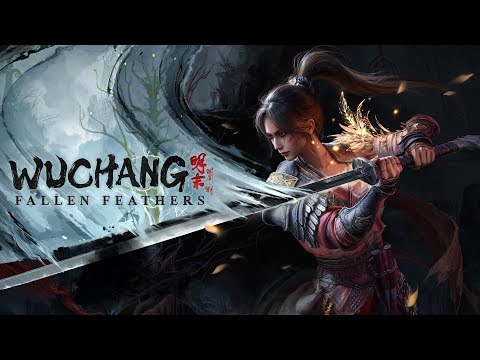
Published globally by 505 Games and developed by Leenzee, WUCHANG: Fallen Feathers is a soulslike, action RPG set in the land of Shu during the dark and tumultuous late Ming Dynasty, plagued with warring factions and a mysterious illness spawning monstrous creatures. Immerse yourself in a rich storyline, dynamic combat system, and breathtaking visuals that offer an unforgettable adventure through lands veiled in chaos and death.
Become WUCHANG, a skilled pirate warrior struck by amnesia, who must navigate the uncertainties of her mysterious past while afflicted by the horrific Feathering disease. Explore the depths of Shu, enhancing your arsenal and mastering new skills harvested from fallen foes. Evolve your fighting style by sacrificing elusive Red Mercury and further develop new techniques obtained throughout your action-packed journey. Augment the weapons in your repertoire with powerful enchantments, allowing for a unique approach to combat and strategy that suits your personal style.
Will you reveal the truth behind WUCHANG's curse and bring peace to Shu, or will you succumb to the encroaching horrors? The fate of the land rests in your hands.
When the highly anticipated WUCHANG: Fallen Feathers is released on July 24th, it will include out-of-the-box support for DLSS 4 with Multi Frame Generation, DLSS Frame Generation, DLSS Super Resolution, and NVIDIA Reflex, accelerating performance and minimizing PC latency, giving GeForce RTX gamers the best possible experience.
Using DLSS 4 with Multi Frame Generation and DLSS Super Resolution, GeForce RTX 50 Series players can multiply WUCHANG: Fallen Feathers’ frame rates by up to 5.9X. For performance charts and further information, head to our new DLSS article.
Game Ready For VALORANT’s Unreal Engine 5 Upgrade
VALORANT is a free-to-play, 5v5 character-based tactical shooter developed by Riot Games. It’s a game of high-stakes gunplay featuring a diverse arsenal of weapons, agents with unique abilities, competitively tuned maps, and gameplay requiring precise skill and fast movement
On July 29th, a new game update will upgrade VALORANT to Unreal Engine 5, and introduce additional content and changes. By installing our new driver you’ll be Game Ready for the new version of the game, which will continue to include support for NVIDIA Reflex.
Stay tuned to VALORANT’s social pages for further updates about the engine upgrade
New NVIDIA App DLSS Overrides Now Available
NVIDIA app is the essential companion for users with NVIDIA GPUs in their PCs and laptops. Whether you're a gaming enthusiast or a content creator, NVIDIA app simplifies the process of keeping your PC updated with the latest GeForce Game Ready and NVIDIA Studio Drivers, and enables quick discovery and installation of NVIDIA applications like GeForce NOW and NVIDIA Broadcast.
NVIDIA app also includes tons of game and experience-enhancing features. One of the most recent additions is the ability to upgrade games and apps with support for DLSS 4 with Multi Frame Generation, and improved DLSS AI models:
- DLSS Multi Frame Generation Override - Enables DLSS Multi Frame Generation for GeForce RTX 50 Series users when Frame Generation is ON in-game
- DLSS Frame Generation Model Upgrade - Enables the latest DLSS Frame Generation model for GeForce RTX 40 Series and GeForce RTX 50 Series users, when Frame Generation is ON in-game, which uses less video memory and can increase frame rates
- DLSS Transformer Model Upgrade - Enables the latest transformer AI model for DLSS Super Resolution, Ray Reconstruction, and DLAA for all GeForce RTX users, when the aforementioned features are ON in-game
- DLAA & Ultra Performance Modes - Sets the internal rendering resolution for DLSS Super Resolution, enabling DLAA or Ultra Performance mode in games lacking native support, when Super Resolution is ON in-game. Or alternatively, set a custom input resolution value to fine tune performance and image quality.
After installing our new GeForce Game Ready Driver and the latest version of NVIDIA app, DLSS 4 override options will be available in the Graphics > Program Settings screen, under “Driver Settings” for each supported title.
In the time since our previous GeForce Game Ready Driver, we’ve added or updated DLSS overrides for 11 games:
- 7 Days to Die
- Brickadia
- Monster Energy Supercross 25 - The Official Video Game
- Monster Hunter Wilds
- REMATCH
- RoboCop: Rogue City - Unfinished Business
- Strinova
- Stygian: Outer Gods
- Warhammer 40,000: Space Marine 2
- Warhammer 40,000: Speed Freeks
- WUCHANG: Fallen Feathers
For a full list of games and apps with DLSS overrides, and a breakdown of which overrides are available in each title, head here.
Optimal Settings For New Games
One-click optimal settings in GeForce Experience and the NVIDIA app enable you to instantly configure game options for your system’s hardware, giving you smooth, optimized gameplay. Over 1,300 titles are supported, and since our last driver release we’ve added support for 3 more:
- Broken Arrow
- Mecha BREAK
- PEAK
GeForce Game Ready Driver - Download Now
Learn more about GeForce Game Ready Drivers here, and download the new GeForce Game Ready 577.00 WHQL driver through the NVIDIA app, or from GeForce.com.
If you experience any technical issues with the new Game Ready drivers please post a detailed report on the GeForce.com Driver Feedback Forum, where our Customer Care team can best assist you. And if you’re looking for a full list of fixes in this driver, for previously-reported issues, head here.